> For the complete documentation index, see [llms.txt](https://atomoh.gitbook.io/kubernetes/llms.txt). Markdown versions of documentation pages are available by appending `.md` to page URLs; this page is available as [Markdown](https://atomoh.gitbook.io/kubernetes/service-mesh/istio.md).
# Istio
> **마지막 업데이트**: 2026년 8월 31일
Amazon EKS에서 Istio Service Mesh를 활용한 실용적인 가이드입니다.
### 2026년 8월 업데이트: Istio 1.30.4 / 1.29.7 보안 패치 릴리스
2026년 8월 27일 Istio 1.30.4와 1.29.7 패치 릴리스가 공개되었습니다. 이번 릴리스는 **보안 수정(**[**ISTIO-SECURITY-2026-006**](https://istio.io/latest/news/security/istio-security-2026-006/)**)을 포함하므로 우선 적용을 권장**합니다:
* **Envoy CVE 13건 수정**: HTTP/2 트레일러 처리의 heap use-after-free(CVE-2026-73513), `ignore_path_parameters_in_path_matching`을 통한 RBAC 우회(CVE-2026-73553), HTTP/2 중복 Host 헤더로 인한 메모리 고갈(CVE-2026-73550) 등
* **Istio CVE 1건 수정**: 사이드카 프록시에서 `BackendTLSPolicy`의 CA 참조가 해석되지 않으면 평문(plaintext)으로 fail-open 되던 문제(GHSA-qm8v-g4f9-qhjx)
* 그 외 원격 클러스터 자격 증명 로테이션 후 네트워크 게이트웨이/엔드포인트가 사라지던 멀티클러스터 버그 등 다수의 안정성 수정
한편 차기 버전 1.31의 릴리스 후보도 8월 25-27일 사이 rc.2부터 rc.4까지 이어져 정식 릴리스가 임박했습니다. 자세한 내용은 [1.30.4 공식 발표](https://istio.io/latest/news/releases/1.30.x/announcing-1.30.4/)를 참고하세요.
### 2026년 8월 업데이트: Istio 1.31 RC 단계 진입
2026년 8월 19일 1.31.0-beta.2에 이어 같은 날 첫 릴리스 후보인 [1.31.0-rc.0](https://github.com/istio/istio/releases)이 공개되어, 차기 마이너 버전 1.31이 RC(release candidate) 단계에 진입했습니다. RC는 GA 직전 최종 검증용 프리릴리스로, 정식 릴리스가 임박했다는 신호입니다. 프로덕션에는 여전히 정식(GA) 릴리스를 사용하세요.
### 2026년 8월 업데이트: Istio 1.31 베타 단계 진입
차기 마이너 버전 Istio 1.31의 릴리스 절차가 진행 중입니다. 2026년 8월 11일 1.31.0-alpha.2에 이어 8월 13일 1.31.0-beta.0, 8월 14일 1.31.0-beta.1이 공개되었습니다. 알파/베타는 프로덕션 용도가 아닌 사전 검증용 프리릴리스이므로, 정식(GA) 릴리스 전 새 기능을 미리 테스트하려는 경우에만 사용하세요. 자세한 내용은 [Istio 릴리스 페이지](https://github.com/istio/istio/releases)를 참고하세요.
### 2026년 7월 업데이트: Istio 1.30.3 / 1.29.6 패치 릴리스
2026년 7월 16일 Istio 1.30.3과 1.29.6 패치 릴리스가 공개되었습니다. 1.30.3의 주요 변경 사항:
* Ambient 모드에서 워크로드/서비스 주소 변경 시 XDS 푸시를 영향받는 waypoint로만 한정해 istiod 확장성 개선
* 원격 클러스터 시크릿(자격 증명/토큰 로테이션) 갱신을 istiod가 재시작 없이 반영하지 못하던 버그 수정
* pilot 노드 untaint 컨트롤러의 taint 이름을 `PILOT_NODE_UNTAINT_CONTROLLERS_TAINT_NAME` 환경 변수로 커스터마이징 가능
자세한 내용은 [공식 발표](https://istio.io/latest/news/releases/1.30.x/announcing-1.30.3/)를 참고하세요.
## 목차
1. [서비스 메시가 정말 필요한가?](#서비스-메시가-정말-필요한가)
2. [설치 및 초기 설정](/kubernetes/service-mesh/istio/01-installation.md)
3. [기본 개념](/kubernetes/service-mesh/istio/02-basic-concepts.md)
4. [아키텍처](/kubernetes/service-mesh/istio/03-architecture.md)
5. [AWS 통합](/kubernetes/service-mesh/istio/04-aws-integration.md)
6. [용어집](/kubernetes/service-mesh/istio/glossary.md)
7. [Traffic Management (트래픽 관리)](/kubernetes/service-mesh/istio/traffic-management.md)
8. [Security (보안)](/kubernetes/service-mesh/istio/security.md)
9. [Observability (관찰성)](/kubernetes/service-mesh/istio/observability.md)
10. [Resilience (복원력)](/kubernetes/service-mesh/istio/resilience.md)
11. [Advanced (고급 기능)](/kubernetes/service-mesh/istio/advanced.md)
12. [Troubleshooting (문제 해결)](/kubernetes/service-mesh/istio/common-errors.md)
13. [모범 사례](/kubernetes/service-mesh/istio/best-practices.md)
14. [대안 비교](/kubernetes/service-mesh/istio/comparison.md)
## Istio란?
Istio는 마이크로서비스를 연결, 보호, 제어 및 관찰하기 위한 오픈 소스 서비스 메시 플랫폼입니다. 복잡한 마이크로서비스 아키텍처에서 서비스 간 통신을 관리하고, 트래픽 제어, 보안, 관찰성을 제공합니다.
### 서비스 메시 개념
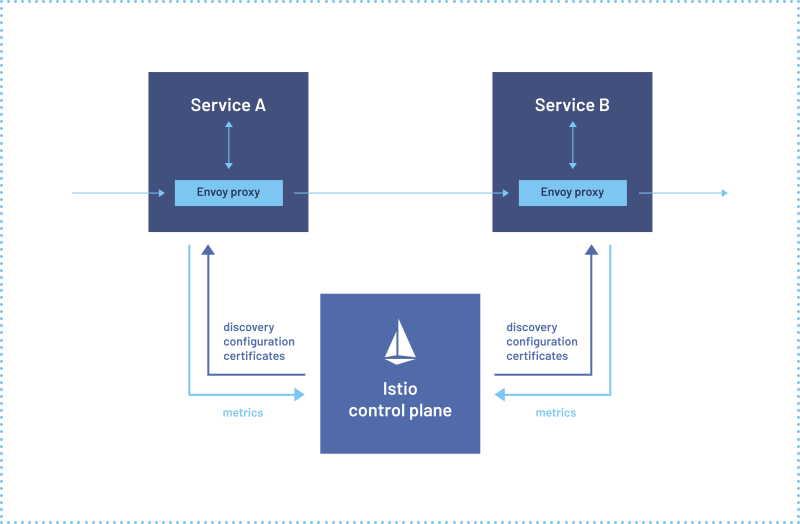
서비스 메시는 마이크로서비스 간의 통신을 관리하는 인프라 계층입니다. Istio는 각 서비스에 Sidecar Proxy (Envoy)를 배치하여 모든 네트워크 트래픽을 가로채고 제어합니다. 이를 통해 애플리케이션 코드 수정 없이 다음과 같은 기능을 제공합니다:
* **트래픽 라우팅**: 지능형 라우팅, 로드 밸런싱, Canary 배포
* **보안**: 자동 mTLS, 인증, 권한 부여
* **관찰성**: 메트릭, 로그, 분산 추적
* **복원력**: Circuit Breaking, Retry, Timeout
### 실제 사용 예시
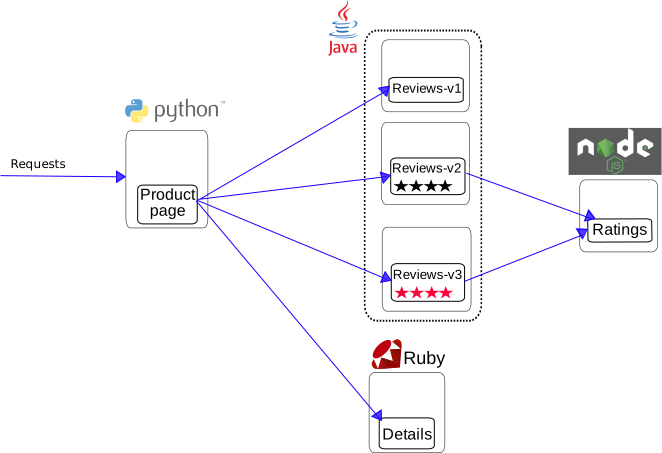
Istio 없는 일반 애플리케이션
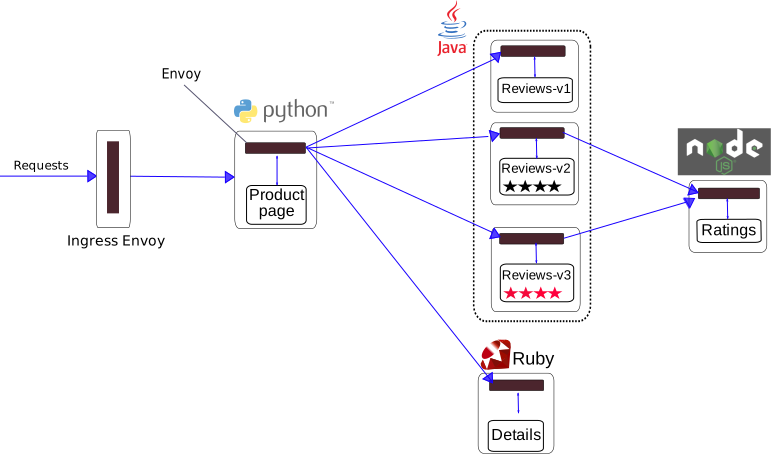
Istio가 적용된 애플리케이션 - 각 서비스에 Envoy Proxy가 Sidecar로 배포됨
Istio를 적용하면 각 마이크로서비스에 Envoy Proxy가 Sidecar 컨테이너로 자동 배포되어, 모든 네트워크 트래픽을 투명하게 가로채고 제어합니다.
## 서비스 메시가 정말 필요한가?
서비스 메시는 강력한 도구이지만, 모든 상황에 적합한 것은 아닙니다. 도입 전에 신중한 검토가 필요합니다.
### 의사결정 흐름

### Service Mesh가 필요한 경우 ✅
#### 1. 복잡한 마이크로서비스 환경

**권장 기준**:
* ✅ 10개 이상의 마이크로서비스
* ✅ 서비스 간 통신이 빈번함 (East-West 트래픽)
* ✅ 다양한 프로그래밍 언어 사용 (Polyglot)
* ✅ 여러 팀이 독립적으로 서비스 개발
#### 2. Zero Trust 보안 요구사항
**Service Mesh 제공**:
* 서비스 간 자동 mTLS 암호화
* SPIFFE 기반 Identity 관리
* 세밀한 인증/인가 정책
* 암호화된 통신 보장
**대안 없이는 달성 어려움**:
* 각 서비스에 보안 로직 중복 구현
* 인증서 수동 관리의 복잡성
* 일관성 없는 보안 정책
#### 3. 고급 트래픽 관리
```yaml
# Canary 배포 (트래픽 분배)
apiVersion: networking.istio.io/v1
kind: VirtualService
metadata:
name: reviews
spec:
hosts:
- reviews
http:
- route:
- destination:
host: reviews
subset: v1
weight: 90
- destination:
host: reviews
subset: v2
weight: 10 # 10%만 새 버전으로
```
**필요한 경우**:
* Canary 배포, A/B 테스트
* 헤더/경로 기반 라우팅
* Traffic Mirroring (Shadow Testing)
* Fault Injection (Chaos Engineering)
* Circuit Breaking, Retry, Timeout
#### 4. 통합 관찰성
**Service Mesh 장점**:
* 애플리케이션 코드 수정 없이 자동 메트릭 수집
* 분산 추적 (Distributed Tracing) 자동 구현
* 통일된 로깅 형식
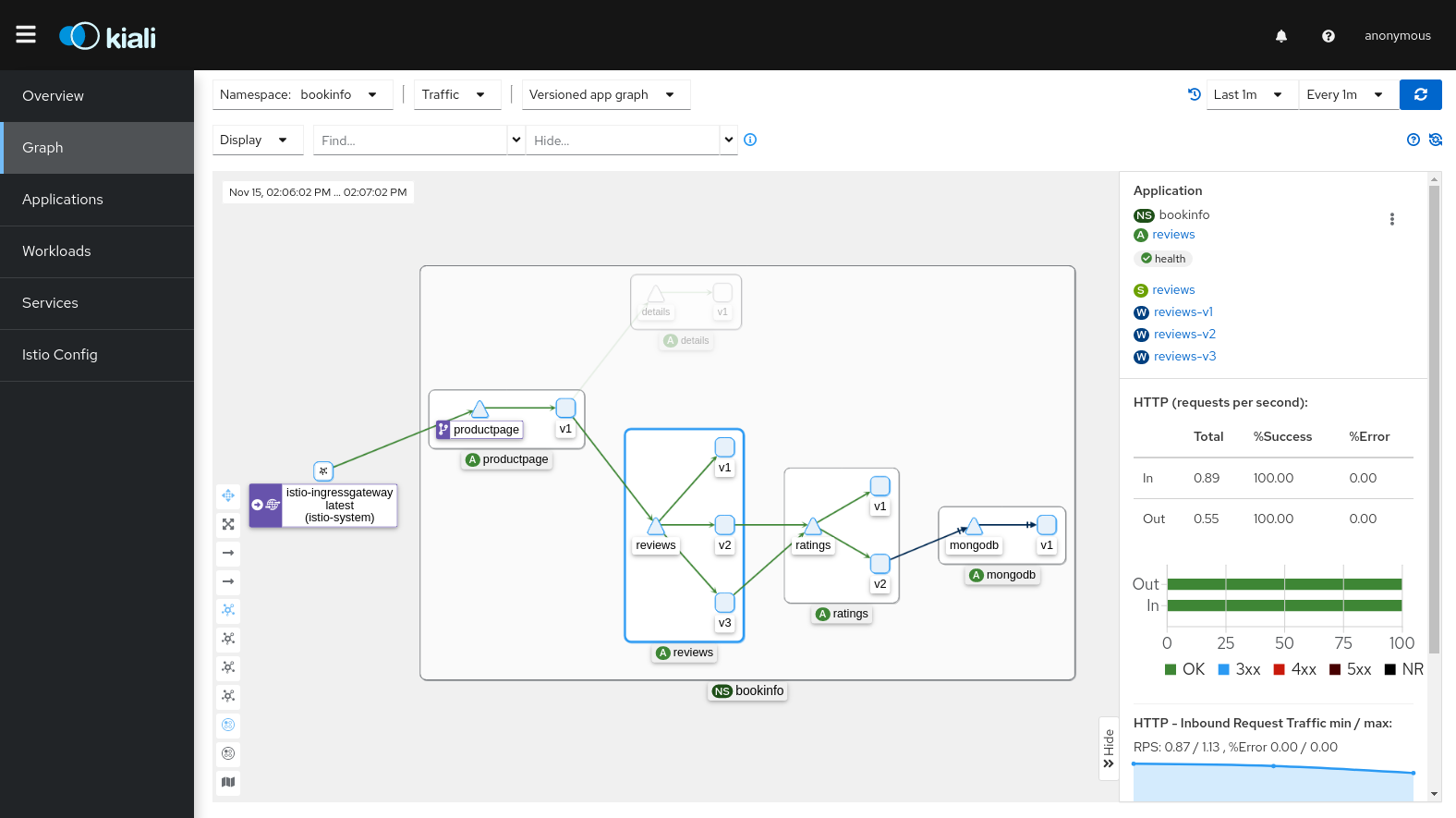
* 서비스 토폴로지 시각화 (Kiali)
### Service Mesh가 불필요한 경우 ❌
#### 1. 단순한 아키텍처

**대신 사용**:
* Kubernetes Ingress Controller (NGINX, Traefik)
* 간단한 로드 밸런서
* Application-level 구현
#### 2. 소수의 마이크로서비스 (<10개)
**오버헤드가 더 큼**:
* Service Mesh 운영 복잡도 > 얻는 이점
* 5-10개 서비스는 수동 관리 가능
* NetworkPolicy로 충분한 보안
**대안**:
```yaml
# Kubernetes NetworkPolicy로 충분
apiVersion: networking.k8s.io/v1
kind: NetworkPolicy
metadata:
name: allow-frontend-to-backend
spec:
podSelector:
matchLabels:
app: backend
ingress:
- from:
- podSelector:
matchLabels:
app: frontend
```
#### 3. 운영 리소스 부족
**Service Mesh 운영 요구사항**:
* Istio/Envoy 전문 지식
* Control Plane 모니터링 및 관리
* 업그레이드 및 패치 관리
* 문제 해결 능력 (디버깅 복잡도 증가)
**팀 준비 필요**:
* 최소 1-2명의 Service Mesh 전문가
* 지속적인 학습 및 업데이트 추적
* 충분한 테스트 환경
#### 4. 성능이 극도로 중요한 경우
**Service Mesh 오버헤드**:
* 지연 시간: +1-3ms (P50), +5-10ms (P99)
* CPU: 파드당 +10-20%
* 메모리: 파드당 +50-100MB (Sidecar 모드)
**대안 고려**:
* Ambient Mode (리소스 사용량 90% 절감)
* CNI 기반 솔루션 (Cilium)
* Application-level 최적화
### 대안 솔루션 비교
| 기능 | Service Mesh | CNI (Cilium) | Ingress Controller | App-level |
| ------------- | ----------------------------------------- | ------------ | ------------------ | --------- |
| **L7 트래픽 관리** | ✅ 완벽 지원 | ⚠️ 제한적 | ⚠️ Ingress만 | ✅ 가능 |
| **mTLS 자동화** | ✅ 완벽 지원 | ✅ 가능 | ❌ 미지원 | ❌ 수동 구현 |
| **분산 추적** | ✅ 자동 | ❌ 미지원 | ❌ 미지원 | ⚠️ 수동 구현 |
| **L3/L4 정책** | ✅ 지원 | ✅ 완벽 지원 | ❌ 미지원 | ❌ 미지원 |
| **운영 복잡도** | 🔴 높음 | 🟡 중간 | 🟢 낮음 | 🟡 중간 |
| **리소스 오버헤드** | 🔴 높음 (Sidecar)
🟢 낮음 (Ambient)
| 🟢 낮음 | 🟢 낮음 | 🟢 없음 |
| **적합한 규모** | 10+ 서비스 | 모든 규모 | 소규모 | 소규모 |
### CNI 기반 솔루션 (Cilium)
Cilium은 eBPF 기반으로 **네트워크 레벨**에서 많은 기능을 제공합니다:

**Cilium이 더 적합한 경우**:
* L3/L4 네트워크 정책이 주요 목적
* 높은 성능이 핵심 요구사항
* Service Mesh 운영 부담 회피
* 간단한 mTLS 및 관찰성만 필요
**참고**: [Cilium 문서](/kubernetes/networking/cilium.md)
### 의사결정 체크리스트
도입 전 다음 질문에 답해보세요:
**아키텍처**:
* [ ] 마이크로서비스가 10개 이상인가?
* [ ] 서비스 간 통신이 복잡한가?
* [ ] 여러 프로그래밍 언어를 사용하는가?
**보안**:
* [ ] Zero Trust 보안 모델이 필요한가?
* [ ] 서비스 간 mTLS 암호화가 필수인가?
* [ ] 세밀한 접근 제어가 필요한가?
**트래픽 관리**:
* [ ] Canary 배포, A/B 테스트가 필요한가?
* [ ] 고급 라우팅 규칙이 필요한가?
* [ ] Circuit Breaking, Retry가 많은 서비스에 필요한가?
**관찰성**:
* [ ] 분산 추적이 필수인가?
* [ ] 통합된 메트릭 수집이 필요한가?
* [ ] 서비스 토폴로지 시각화가 필요한가?
**운영**:
* [ ] Service Mesh 전문가가 있는가?
* [ ] 운영 복잡도를 감당할 수 있는가?
* [ ] 리소스 오버헤드를 수용할 수 있는가?
**결과**:
* ✅ 10개 이상 체크: Service Mesh 강력 권장
* 🟡 5-9개 체크: 신중한 평가 필요, 작은 규모로 시작 (Ambient Mode 추천)
* ❌ 4개 이하 체크: 대안 솔루션 고려 (CNI, Ingress, App-level)
### 점진적 도입 전략
Service Mesh가 필요하다고 판단되면, 점진적으로 도입하세요:

**권장 순서**:
1. **Pilot 프로젝트** (1-2개 네임스페이스)
2. **관찰성 먼저** (메트릭, 로그, 추적)
3. **보안 적용** (mTLS PERMISSIVE → STRICT)
4. **트래픽 관리** (VirtualService, DestinationRule)
5. **전사 확대**
### 주요 기능
1. **트래픽 관리**
* 지능형 라우팅 및 로드 밸런싱
* A/B 테스트, Canary 배포, Blue/Green 배포
* Circuit Breaking, Retry, Timeout 제어
* Traffic Mirroring 및 Fault Injection
2. **보안**
* 서비스 간 자동 mTLS 암호화
* 강력한 인증 및 권한 부여
* 세밀한 액세스 제어 정책
* 네트워크 격리 및 보안 정책
3. **관찰성**
* 자동 메트릭, 로그, 트레이스 생성
* Prometheus, Grafana, Jaeger, Kiali 통합
* 서비스 토폴로지 시각화
* 실시간 트래픽 모니터링
4. **복원력**
* Circuit Breaker 패턴
* Rate Limiting
* Outlier Detection
* Zone Aware Routing
### Istio 아키텍처
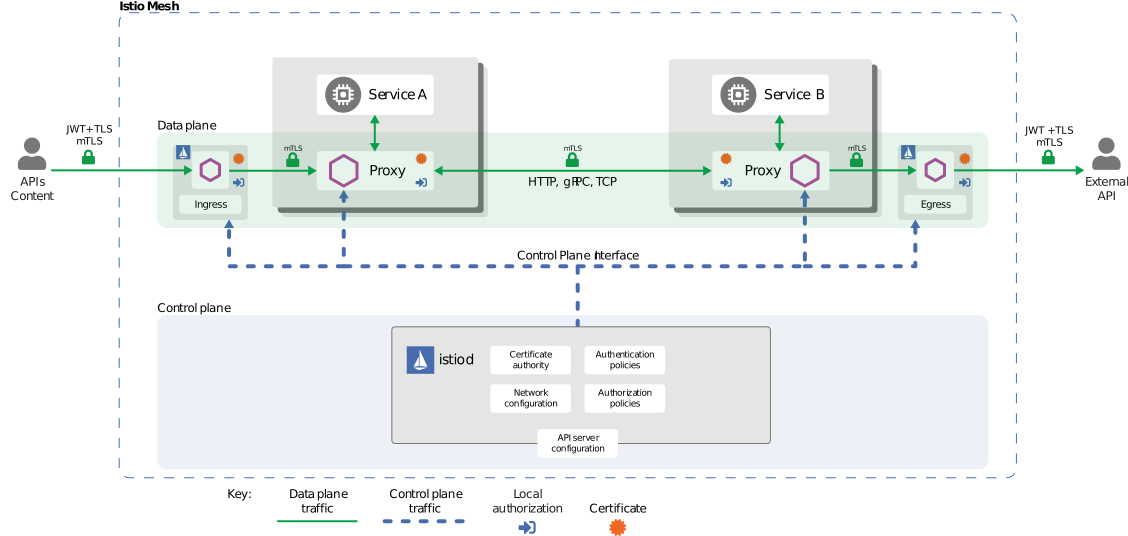
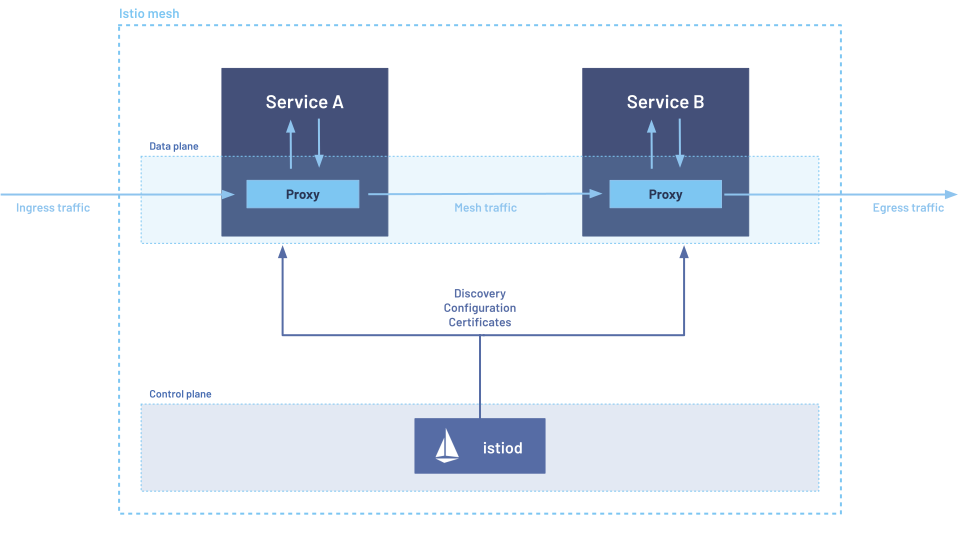
Istio는 Control Plane과 Data Plane으로 구성됩니다:

**Control Plane (istiod)**:
* **Pilot**: 서비스 디스커버리, 트래픽 라우팅 규칙 관리
* **Citadel**: 인증서 생성 및 관리, mTLS 활성화
* **Galley**: 구성 검증 및 배포
**Data Plane**:
* **Envoy Proxy**: 각 파드에 사이드카로 배포되어 모든 네트워크 트래픽을 가로채고 제어
### Amazon EKS에서 Istio 사용의 이점
1. **간편한 마이크로서비스 관리**
* 애플리케이션 코드 수정 없이 트래픽 관리
* 선언적 구성으로 일관된 정책 적용
* Kubernetes Native API 사용
2. **강화된 보안**
* 서비스 간 자동 암호화
* AWS IAM과 통합된 인증
* 세밀한 권한 제어
3. **향상된 관찰성**
* Amazon CloudWatch와 통합
* AWS X-Ray를 통한 분산 추적
* 상세한 메트릭 및 로그
4. **AWS 서비스와의 통합**
* Application Load Balancer (ALB) 통합
* AWS Certificate Manager (ACM) 통합
* Amazon EBS CSI Driver와 호환
### 시작하기
Istio를 처음 사용하신다면 다음 순서로 문서를 읽어보세요:
1. [**설치 및 초기 설정**](/kubernetes/service-mesh/istio/01-installation.md): EKS 클러스터에 Istio 설치
2. [**기본 개념**](/kubernetes/service-mesh/istio/02-basic-concepts.md): Istio의 핵심 개념 이해
3. [**Traffic Management**](/kubernetes/service-mesh/istio/traffic-management.md): Gateway, VirtualService, DestinationRule 학습
4. [**Security**](/kubernetes/service-mesh/istio/security.md): mTLS, 인증, 권한 부여 설정
5. [**Observability**](/kubernetes/service-mesh/istio/observability.md): 메트릭, 로그, 트레이스 수집
6. [**모범 사례**](/kubernetes/service-mesh/istio/best-practices.md): 프로덕션 환경에서의 권장 사항
### 실습 예제
각 섹션에는 실제로 작동하는 YAML 예제가 포함되어 있습니다. 모든 예제는 다음과 같이 클릭하여 복사할 수 있도록 구성되어 있습니다:
```yaml
# 예제 VirtualService
apiVersion: networking.istio.io/v1
kind: VirtualService
metadata:
name: reviews
spec:
hosts:
- reviews
http:
- route:
- destination:
host: reviews
subset: v1
```
### 참고 자료
* [Istio 공식 문서](https://istio.io/latest/docs/)
* [Istio GitHub](https://github.com/istio/istio)
* [AWS EKS 워크숍 - Istio](https://www.eksworkshop.com/intermediate/330_servicemesh_using_istio/)
* [Istio 커뮤니티](https://discuss.istio.io/)
### 퀴즈
이 장에서 배운 내용을 테스트하려면 다음 퀴즈를 풀어보세요:
* [Traffic Management 퀴즈](/kubernetes/quiz/service-mesh/istio/traffic-management.md)
* [Security 퀴즈](/kubernetes/quiz/service-mesh/istio/security.md)
* [Observability 퀴즈](/kubernetes/quiz/service-mesh/istio/observability.md)
* [Resilience 퀴즈](/kubernetes/quiz/service-mesh/istio/resilience.md)
* [Advanced 퀴즈](/kubernetes/quiz/service-mesh/istio/advanced.md)