> For the complete documentation index, see [llms.txt](https://atomoh.gitbook.io/kubernetes/llms.txt). Markdown versions of documentation pages are available by appending `.md` to page URLs; this page is available as [Markdown](https://atomoh.gitbook.io/kubernetes/en/service-mesh/istio/security/01-mtls.md).
# mTLS
Mutual TLS (mTLS) is a core security feature of Istio that automatically encrypts and authenticates service-to-service communication.
## Table of Contents
1. [mTLS Overview](#mtls-overview)
2. [mTLS Modes](#mtls-modes)
3. [Certificate Management](#certificate-management)
4. [PeerAuthentication Configuration](#peerauthentication-configuration)
5. [mTLS Integration with AWS Services](#mtls-integration-with-aws-services)
6. [mTLS with External Services](#mtls-with-external-services)
7. [Migration Strategy](#migration-strategy)
8. [Common Issues and Solutions](#common-issues-and-solutions)
9. [Performance and Monitoring](#performance-and-monitoring)
## mTLS Overview
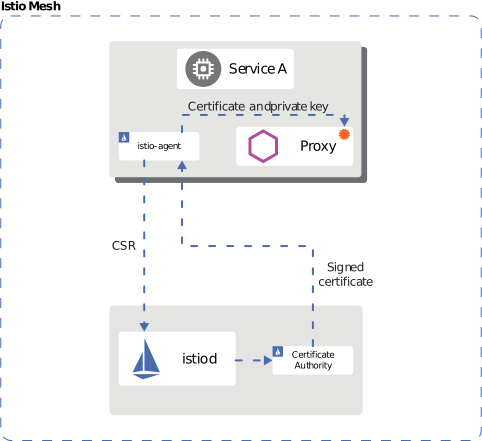
Proxy]
end
subgraph Pod2["Pod B"]
Envoy2[Envoy
Proxy]
App2[Application]
end
Istiod[istiod
Certificate Issuance]
App1 -->|Plaintext| Envoy1
Envoy1 <-->|mTLS Encrypted| Envoy2
Envoy2 -->|Plaintext| App2
Istiod -.->|Certificate| Envoy1
Istiod -.->|Certificate| Envoy2
%% Style definitions
classDef app fill:#00C7B7,stroke:#333,stroke-width:1px,color:white;
classDef proxy fill:#3B48CC,stroke:#333,stroke-width:1px,color:white;
classDef control fill:#FF9900,stroke:#333,stroke-width:1px,color:black;
%% Class applications
class App1,App2 app;
class Envoy1,Envoy2 proxy;
class Istiod control;
```
## mTLS Modes
### STRICT Mode (Recommended)
```yaml
apiVersion: security.istio.io/v1
kind: PeerAuthentication
metadata:
name: default
namespace: istio-system
spec:
mtls:
mode: STRICT # Only mTLS allowed
```
### PERMISSIVE Mode (For Migration)
```yaml
apiVersion: security.istio.io/v1
kind: PeerAuthentication
metadata:
name: default
namespace: default
spec:
mtls:
mode: PERMISSIVE # Both mTLS and plaintext allowed
```
### DISABLE Mode
```yaml
apiVersion: security.istio.io/v1
kind: PeerAuthentication
metadata:
name: disable-mtls
namespace: default
spec:
mtls:
mode: DISABLE # mTLS disabled
```
## Certificate Management

Self-signed]
IntermediateCA[Intermediate CA
Workload Certificate Issuance]
end
subgraph Workloads["Workloads"]
Cert1[Service A
Certificate]
Cert2[Service B
Certificate]
Cert3[Service C
Certificate]
end
RootCA -->|Sign| IntermediateCA
IntermediateCA -->|Issue| Cert1
IntermediateCA -->|Issue| Cert2
IntermediateCA -->|Issue| Cert3
%% Style definitions
classDef ca fill:#FF9900,stroke:#333,stroke-width:2px,color:black;
classDef cert fill:#326CE5,stroke:#333,stroke-width:1px,color:white;
%% Class applications
class RootCA,IntermediateCA ca;
class Cert1,Cert2,Cert3 cert;
```
**Default Certificate Properties**:
* Validity period: **90 days** (auto-renewal: 24 hours before expiration)
* Key size: 2048-bit RSA
* Signature algorithm: SHA-256
### Certificate Verification
```bash
# 1. Check CA certificate
kubectl get secret istio-ca-secret -n istio-system -o yaml
# 2. Check workload certificate
istioctl proxy-config secret -n
# 3. Certificate details
istioctl proxy-config secret -n -o json | \
jq -r '.dynamicActiveSecrets[0].secret.tlsCertificate.certificateChain.inlineBytes' | \
base64 -d | openssl x509 -text -noout
# 4. Check certificate expiration date
istioctl proxy-config secret -n -o json | \
jq -r '.dynamicActiveSecrets[0].secret.tlsCertificate.certificateChain.inlineBytes' | \
base64 -d | openssl x509 -noout -dates
```
### Using Custom CA Certificates
In production environments, it's recommended to use enterprise internal CAs or public CAs.
#### Step 1: Generate CA Certificate and Key
```bash
# 1. Generate Root CA
openssl genrsa -out root-key.pem 4096
openssl req -new -x509 -days 3650 -key root-key.pem \
-out root-cert.pem \
-subj "/C=US/ST=California/L=San Francisco/O=MyOrg/OU=IT/CN=Root CA"
# 2. Generate Intermediate CA
openssl genrsa -out ca-key.pem 4096
openssl req -new -key ca-key.pem -out ca-cert.csr \
-subj "/C=US/ST=California/L=San Francisco/O=MyOrg/OU=IT/CN=Intermediate CA"
# 3. Sign Intermediate CA with Root CA
cat > ca-extensions.txt < cert-chain.pem
```
#### Step 2: Create Kubernetes Secret
```bash
kubectl create secret generic cacerts -n istio-system \
--from-file=ca-cert.pem=ca-cert.pem \
--from-file=ca-key.pem=ca-key.pem \
--from-file=root-cert.pem=root-cert.pem \
--from-file=cert-chain.pem=cert-chain.pem
```
#### Step 3: Restart Istio
```bash
# Restart istiod to load new CA certificate
kubectl rollout restart deployment/istiod -n istio-system
# Restart all workloads to issue new certificates
kubectl rollout restart deployment -n
```
#### Step 4: Verification
```bash
# Verify CA certificate is loaded correctly
kubectl logs -l app=istiod -n istio-system | grep "Use plugged-in cert"
# Verify workload certificates are issued by new CA
istioctl proxy-config secret -n -o json | \
jq -r '.dynamicActiveSecrets[0].secret.tlsCertificate.certificateChain.inlineBytes' | \
base64 -d | openssl x509 -noout -issuer
```
### AWS Certificate Manager (ACM) Integration
You can use ACM Private CA to manage Istio certificates.
#### Step 1: Create ACM Private CA
```bash
# Create ACM Private CA
aws acm-pca create-certificate-authority \
--certificate-authority-configuration \
"KeyAlgorithm=RSA_4096,SigningAlgorithm=SHA256WITHRSA,Subject={CommonName=Istio CA}" \
--certificate-authority-type ROOT \
--tags Key=Name,Value=istio-root-ca
# Save CA ARN
CA_ARN=$(aws acm-pca list-certificate-authorities \
--query 'CertificateAuthorities[0].Arn' --output text)
# Generate Root CA certificate
aws acm-pca get-certificate-authority-csr \
--certificate-authority-arn $CA_ARN \
--output text > ca.csr
aws acm-pca issue-certificate \
--certificate-authority-arn $CA_ARN \
--csr fileb://ca.csr \
--signing-algorithm SHA256WITHRSA \
--template-arn arn:aws:acm-pca:::template/RootCACertificate/V1 \
--validity Value=10,Type=YEARS
# Install certificate
CERT_ARN=$(aws acm-pca list-certificates \
--certificate-authority-arn $CA_ARN \
--query 'Certificates[0].Arn' --output text)
aws acm-pca get-certificate \
--certificate-authority-arn $CA_ARN \
--certificate-arn $CERT_ARN \
--output text > root-cert.pem
aws acm-pca import-certificate-authority-certificate \
--certificate-authority-arn $CA_ARN \
--certificate fileb://root-cert.pem
```
#### Step 2: Install Cert-Manager + AWS PCA Issuer
```bash
# Install Cert-Manager
kubectl apply -f https://github.com/cert-manager/cert-manager/releases/download/v1.13.0/cert-manager.yaml
# Install AWS PCA Issuer
helm repo add awspca https://cert-manager.github.io/aws-privateca-issuer
helm install aws-pca-issuer awspca/aws-privateca-issuer -n cert-manager
```
#### Step 3: Create AWSPCAIssuer
```yaml
apiVersion: awspca.cert-manager.io/v1beta1
kind: AWSPCAClusterIssuer
metadata:
name: istio-ca
spec:
arn: ${CA_ARN}
region: us-west-2
```
#### Step 4: Use in Istio
```yaml
apiVersion: cert-manager.io/v1
kind: Certificate
metadata:
name: istio-ca-cert
namespace: istio-system
spec:
secretName: cacerts
commonName: "Istio CA"
isCA: true
duration: 87600h # 10 years
renewBefore: 720h # 30 days
issuerRef:
kind: AWSPCAClusterIssuer
name: istio-ca
```
### Certificate Renewal Policy
```yaml
# Configure certificate policy with Istio Operator
apiVersion: install.istio.io/v1alpha1
kind: IstioOperator
metadata:
name: istio-control-plane
namespace: istio-system
spec:
meshConfig:
certificates:
- secretName: dns.istio-system-service-account
dnsNames:
- istiod.istio-system.svc
- istiod.istio-system
caCertificates:
- secretName: cacerts
certProvider: cert-manager
values:
pilot:
env:
# Workload certificate TTL (default: 24 hours)
CITADEL_CERT_TTL: "24h"
# Certificate renewal grace period (default: 15 minutes)
CITADEL_GRACE_PERIOD: "15m"
```
### Certificate Rotation
```bash
# 1. Generate new CA certificate (repeat steps above)
# 2. Update existing Secret
kubectl create secret generic cacerts -n istio-system \
--from-file=ca-cert.pem=new-ca-cert.pem \
--from-file=ca-key.pem=new-ca-key.pem \
--from-file=root-cert.pem=new-root-cert.pem \
--from-file=cert-chain.pem=new-cert-chain.pem \
--dry-run=client -o yaml | kubectl apply -f -
# 3. Restart istiod (zero-downtime rolling update)
kubectl rollout restart deployment/istiod -n istio-system
# 4. Gradual workload certificate renewal
# Method 1: Wait for automatic renewal (within 24 hours)
# Method 2: Manual rolling restart
for ns in $(kubectl get ns -o jsonpath='{.items[*].metadata.name}'); do
echo "Restarting deployments in namespace: $ns"
kubectl rollout restart deployment -n $ns
done
```
## PeerAuthentication Configuration
### Global Configuration
```yaml
apiVersion: security.istio.io/v1
kind: PeerAuthentication
metadata:
name: default
namespace: istio-system
spec:
mtls:
mode: STRICT
```
### Namespace-level Configuration
```yaml
apiVersion: security.istio.io/v1
kind: PeerAuthentication
metadata:
name: namespace-policy
namespace: production
spec:
mtls:
mode: STRICT
```
### Workload-level Configuration
```yaml
apiVersion: security.istio.io/v1
kind: PeerAuthentication
metadata:
name: workload-policy
namespace: default
spec:
selector:
matchLabels:
app: reviews
version: v1
mtls:
mode: STRICT
```
### Port-level Configuration
```yaml
apiVersion: security.istio.io/v1
kind: PeerAuthentication
metadata:
name: port-policy
namespace: default
spec:
selector:
matchLabels:
app: myapp
mtls:
mode: STRICT
portLevelMtls:
8080:
mode: DISABLE # mTLS disabled for port 8080
```
## mTLS Integration with AWS Services
### AWS Application Load Balancer (ALB) and mTLS
ALB supports client certificate-based mTLS.
```mermaid
flowchart LR
Client[Client
Client Cert]
ALB[ALB
mTLS Termination]
Gateway[Istio Gateway
TLS]
Service[Backend Service
Envoy mTLS]
Client <-->|mTLS| ALB
ALB <-->|TLS| Gateway
Gateway <-->|mTLS| Service
%% Style definitions
classDef aws fill:#FF9900,stroke:#333,stroke-width:2px,color:black;
classDef istio fill:#326CE5,stroke:#333,stroke-width:2px,color:white;
classDef client fill:#00C7B7,stroke:#333,stroke-width:1px,color:white;
%% Class applications
class Client client;
class ALB aws;
class Gateway,Service istio;
```
#### Step 1: Configure mTLS on ALB
```bash
# 1. Create Trust Store (upload CA certificate)
aws elbv2 create-trust-store \
--name istio-client-trust-store \
--ca-certificates-bundle-s3-bucket my-bucket \
--ca-certificates-bundle-s3-key ca-bundle.pem
# 2. Configure mTLS on ALB listener
aws elbv2 modify-listener \
--listener-arn arn:aws:elasticloadbalancing:region:account:listener/app/my-alb/xxx \
--mutual-authentication Mode=verify,TrustStoreArn=arn:aws:elasticloadbalancing:region:account:truststore/istio-client-trust-store/xxx
```
#### Step 2: AWS Load Balancer Controller Configuration
```yaml
apiVersion: v1
kind: Service
metadata:
name: istio-gateway
namespace: istio-system
annotations:
service.beta.kubernetes.io/aws-load-balancer-type: "external"
service.beta.kubernetes.io/aws-load-balancer-nlb-target-type: "ip"
service.beta.kubernetes.io/aws-load-balancer-scheme: "internet-facing"
# mTLS configuration
service.beta.kubernetes.io/aws-load-balancer-ssl-cert: "arn:aws:acm:region:account:certificate/xxx"
service.beta.kubernetes.io/aws-load-balancer-ssl-negotiation-policy: "ELBSecurityPolicy-TLS13-1-2-2021-06"
service.beta.kubernetes.io/aws-load-balancer-mutual-authentication: '[{"port": 443, "mode": "verify", "trustStore": "arn:aws:elasticloadbalancing:region:account:truststore/istio-client-trust-store/xxx"}]'
spec:
type: LoadBalancer
selector:
istio: ingressgateway
ports:
- name: https
port: 443
targetPort: 8443
```
#### Step 3: Verify Client Certificate at Istio Gateway
```yaml
apiVersion: networking.istio.io/v1
kind: Gateway
metadata:
name: public-gateway
namespace: istio-system
spec:
selector:
istio: ingressgateway
servers:
- port:
number: 8443
name: https
protocol: HTTPS
tls:
mode: SIMPLE # ALB already completed mTLS verification
credentialName: gateway-cert
hosts:
- "*.example.com"
---
apiVersion: v1
kind: ConfigMap
metadata:
name: istio-envoy-custom
namespace: istio-system
data:
custom-bootstrap.yaml: |
static_resources:
listeners:
- name: http_listener
address:
socket_address:
address: 0.0.0.0
port_value: 8443
filter_chains:
- filters:
- name: envoy.filters.network.http_connection_manager
typed_config:
"@type": type.googleapis.com/envoy.extensions.filters.network.http_connection_manager.v3.HttpConnectionManager
# Verify client certificate headers forwarded from ALB
forward_client_cert_details: APPEND_FORWARD
set_current_client_cert_details:
subject: true
cert: true
chain: true
dns: true
uri: true
```
#### Step 4: Forward Client Certificate Information
ALB forwards client certificate information as HTTP headers:
```yaml
apiVersion: security.istio.io/v1beta1
kind: AuthorizationPolicy
metadata:
name: verify-client-cert
namespace: default
spec:
action: ALLOW
rules:
- when:
- key: request.headers[x-amzn-mtls-clientcert-serial-number]
values: ["*"]
- key: request.headers[x-amzn-mtls-clientcert-subject]
values: ["CN=trusted-client,O=MyOrg*"]
```
**Headers forwarded by ALB**:
* `X-Amzn-Mtls-Clientcert-Serial-Number`: Certificate serial number
* `X-Amzn-Mtls-Clientcert-Subject`: Certificate Subject DN
* `X-Amzn-Mtls-Clientcert-Issuer`: Certificate Issuer DN
* `X-Amzn-Mtls-Clientcert-Validity`: Validity period
* `X-Amzn-Mtls-Clientcert-Leaf`: Client certificate (PEM)
### Amazon CloudFront and mTLS
CloudFront supports client certificate verification.
```mermaid
flowchart LR
Client[Client
Client Cert]
CloudFront[CloudFront
mTLS + Edge]
ALB[ALB
TLS]
Gateway[Istio Gateway]
Service[Backend Service
Envoy mTLS]
Client <-->|mTLS| CloudFront
CloudFront <-->|TLS| ALB
ALB <-->|TLS| Gateway
Gateway <-->|mTLS| Service
%% Style definitions
classDef aws fill:#FF9900,stroke:#333,stroke-width:2px,color:black;
classDef istio fill:#326CE5,stroke:#333,stroke-width:2px,color:white;
classDef client fill:#00C7B7,stroke:#333,stroke-width:1px,color:white;
%% Class applications
class Client client;
class CloudFront,ALB aws;
class Gateway,Service istio;
```
#### Step 1: Create CloudFront Distribution
```bash
# 1. Upload Trust Store (CA certificate) to S3
aws s3 cp ca-bundle.pem s3://my-bucket/ca-bundle.pem
# 2. Create CloudFront distribution
cat > cloudfront-config.json <Client Cert]
subgraph AWS ["AWS Edge"]
CF[CloudFront
mTLS Verification]
ALB[ALB
Header Forwarding]
end
subgraph EKS ["EKS Cluster"]
Gateway[Istio Gateway
Header Validation]
subgraph Mesh ["Service Mesh"]
ServiceA[Service A
Envoy mTLS]
ServiceB[Service B
Envoy mTLS]
ServiceC[Service C
Envoy mTLS]
end
end
Client <-->|1\. mTLS| CF
CF -->|2\. TLS + Headers| ALB
ALB -->|3\. TLS + Headers| Gateway
Gateway <-->|4\. mTLS| ServiceA
ServiceA <-->|5\. mTLS| ServiceB
ServiceB <-->|6\. mTLS| ServiceC
%% Style definitions
classDef client fill:#00C7B7,stroke:#333,stroke-width:2px,color:white;
classDef aws fill:#FF9900,stroke:#333,stroke-width:2px,color:black;
classDef istio fill:#326CE5,stroke:#333,stroke-width:2px,color:white;
%% Class applications
class Client client;
class CF,ALB aws;
class Gateway,ServiceA,ServiceB,ServiceC istio;
```
**Security per segment**:
1. **Client -> CloudFront**: mTLS (client certificate verification)
2. **CloudFront -> ALB**: TLS + certificate info headers
3. **ALB -> Istio Gateway**: TLS + certificate info headers
4. **Inside Istio Mesh**: Automatic mTLS (Envoy-to-Envoy)
## mTLS with External Services
### Legacy System Integration
```yaml
# When legacy system doesn't support mTLS
apiVersion: networking.istio.io/v1beta1
kind: DestinationRule
metadata:
name: legacy-system
namespace: default
spec:
host: legacy.external.com
trafficPolicy:
tls:
mode: SIMPLE # Use one-way TLS only
---
apiVersion: networking.istio.io/v1beta1
kind: ServiceEntry
metadata:
name: legacy-system
namespace: default
spec:
hosts:
- legacy.external.com
ports:
- number: 443
name: https
protocol: HTTPS
location: MESH_EXTERNAL
resolution: DNS
```
### External API mTLS Client Authentication
When Istio needs to present a client certificate to an external API:
```yaml
# 1. Create client certificate Secret
apiVersion: v1
kind: Secret
metadata:
name: client-mtls-credential
namespace: istio-system
type: kubernetes.io/tls
data:
tls.crt:
tls.key:
ca.crt:
---
# 2. Configure client certificate in DestinationRule
apiVersion: networking.istio.io/v1beta1
kind: DestinationRule
metadata:
name: external-api-mtls
namespace: default
spec:
host: api.external.com
trafficPolicy:
tls:
mode: MUTUAL # Use mTLS
clientCertificate: /etc/certs/tls.crt
privateKey: /etc/certs/tls.key
caCertificates: /etc/certs/ca.crt
---
# 3. Register external API with ServiceEntry
apiVersion: networking.istio.io/v1beta1
kind: ServiceEntry
metadata:
name: external-api
namespace: default
spec:
hosts:
- api.external.com
ports:
- number: 443
name: https
protocol: HTTPS
location: MESH_EXTERNAL
resolution: DNS
```
### External mTLS via Egress Gateway
```yaml
# 1. Deploy Egress Gateway
apiVersion: install.istio.io/v1alpha1
kind: IstioOperator
spec:
components:
egressGateways:
- name: istio-egressgateway
enabled: true
k8s:
serviceAnnotations:
networking.istio.io/exportTo: "*"
---
# 2. Gateway resource
apiVersion: networking.istio.io/v1
kind: Gateway
metadata:
name: egress-gateway
namespace: istio-system
spec:
selector:
istio: egressgateway
servers:
- port:
number: 443
name: tls
protocol: TLS
hosts:
- api.external.com
tls:
mode: ISTIO_MUTUAL # mTLS inside mesh
---
# 3. Route traffic with VirtualService
apiVersion: networking.istio.io/v1
kind: VirtualService
metadata:
name: external-api-through-egress
namespace: default
spec:
hosts:
- api.external.com
gateways:
- mesh # From inside mesh
- istio-system/egress-gateway # To Egress Gateway
http:
- match:
- gateways:
- mesh
port: 443
route:
- destination:
host: istio-egressgateway.istio-system.svc.cluster.local
port:
number: 443
- match:
- gateways:
- istio-system/egress-gateway
port: 443
route:
- destination:
host: api.external.com
port:
number: 443
---
# 4. DestinationRule (from Egress Gateway to external)
apiVersion: networking.istio.io/v1beta1
kind: DestinationRule
metadata:
name: external-api-mtls
namespace: istio-system
spec:
host: api.external.com
trafficPolicy:
tls:
mode: MUTUAL
clientCertificate: /etc/istio/egress-certs/tls.crt
privateKey: /etc/istio/egress-certs/tls.key
caCertificates: /etc/istio/egress-certs/ca.crt
```
## Migration Strategy
### Step 1: Check Current State
```bash
# Check current mTLS configuration
kubectl get peerauthentication -A
# Check mTLS status by service
istioctl authn tls-check -n
```
### Step 2: Switch to PERMISSIVE Mode
```yaml
apiVersion: security.istio.io/v1
kind: PeerAuthentication
metadata:
name: default
namespace: istio-system
spec:
mtls:
mode: PERMISSIVE # Allow both mTLS and plaintext
```
### Step 3: Monitoring
```bash
# Verify mTLS connections
kubectl exec -it -c istio-proxy -- \
curl -s localhost:15000/stats/prometheus | grep ssl
# Verify plaintext connections
kubectl exec -it -c istio-proxy -- \
curl -s localhost:15000/stats/prometheus | grep plaintext
```
### Step 4: Switch to STRICT Mode
```yaml
apiVersion: security.istio.io/v1
kind: PeerAuthentication
metadata:
name: default
namespace: istio-system
spec:
mtls:
mode: STRICT # Only mTLS allowed
```
## Common Issues and Solutions
### 1. mTLS Connection Failure
**Symptoms**:
```
upstream connect error or disconnect/reset before headers. reset reason: connection failure
```
**Root Cause Analysis**:
```bash
# 1. Check PeerAuthentication
kubectl get peerauthentication -A
# 2. Check DestinationRule mTLS mode
kubectl get destinationrule -A -o yaml | grep -A 5 "trafficPolicy"
# 3. Check certificates
istioctl proxy-config secret -n
# 4. Verify TLS connection
istioctl authn tls-check -n
# 5. Check Envoy logs in detail
kubectl logs -c istio-proxy -n | grep -E "(TLS|SSL|certificate)"
```
**Solutions**:
1. **PeerAuthentication and DestinationRule mismatch**:
```yaml
# Problem: PeerAuthentication is STRICT, DestinationRule is DISABLE
# Solution: Change DestinationRule to ISTIO_MUTUAL
apiVersion: networking.istio.io/v1beta1
kind: DestinationRule
metadata:
name: fix-mtls
spec:
host: myservice.default.svc.cluster.local
trafficPolicy:
tls:
mode: ISTIO_MUTUAL # Match STRICT mode
```
2. **Pod without sidecar injection**:
```bash
# Add istio-injection label to namespace
kubectl label namespace default istio-injection=enabled
# Restart pod
kubectl rollout restart deployment/ -n default
```
### 2. Certificate Expiration Issue
**Symptoms**:
```
TLS error: Secret is not supplied by SDS
x509: certificate has expired
```
**Check Certificate Expiration**:
```bash
# Check workload certificate expiration date
istioctl proxy-config secret -n -o json | \
jq -r '.dynamicActiveSecrets[0].secret.tlsCertificate.certificateChain.inlineBytes' | \
base64 -d | openssl x509 -noout -dates
# Check CA certificate expiration
kubectl get secret istio-ca-secret -n istio-system -o json | \
jq -r '.data."ca-cert.pem"' | base64 -d | openssl x509 -noout -dates
# Check certificate expiration for all workloads
for pod in $(kubectl get pods -n default -o jsonpath='{.items[*].metadata.name}'); do
echo "Pod: $pod"
istioctl proxy-config secret $pod -n default -o json 2>/dev/null | \
jq -r '.dynamicActiveSecrets[0].secret.tlsCertificate.certificateChain.inlineBytes' | \
base64 -d 2>/dev/null | openssl x509 -noout -dates 2>/dev/null || echo "No cert found"
done
```
**Solutions**:
```bash
# 1. Restart istiod (trigger new certificate issuance)
kubectl rollout restart deployment/istiod -n istio-system
# 2. Restart specific workload (renew certificate)
kubectl delete pod -n
# 3. Renew CA certificate (see "Certificate Rotation" section above)
```
### 3. Clock Skew (Time Synchronization Issue)
**Symptoms**:
```
certificate is not valid yet
certificate verify failed
```
**Cause**: Certificate verification failure due to time difference between pods/nodes
**Verification**:
```bash
# Check node time
kubectl get nodes -o wide
for node in $(kubectl get nodes -o jsonpath='{.items[*].metadata.name}'); do
echo "Node: $node"
kubectl debug node/$node -it --image=busybox -- date
done
# Check pod time
kubectl exec -it -c istio-proxy -n -- date
# Check time difference (acceptable range: +/- 5 minutes)
```
**Solutions**:
```bash
# 1. NTP configuration (node level)
sudo systemctl restart chrony
sudo chronyc tracking
# 2. NTP sync is default on EKS
# Verify Amazon Time Sync Service usage
curl http://169.254.169.123/latest/meta-data/system
# 3. Add grace period to certificate start time
# Istio Operator configuration
apiVersion: install.istio.io/v1alpha1
kind: IstioOperator
spec:
values:
pilot:
env:
CERT_NOTBEFORE_GRACE_DURATION: "10m" # Start time grace period
```
### 4. Circular Dependency
**Symptoms**:
```
upstream connect error or disconnect/reset before headers
```
**Cause**: mTLS handshake timeout during Service A -> Service B -> Service A calls
**Verification**:
```bash
# Check service call chain
istioctl analyze -n
# Check Envoy clusters
istioctl proxy-config cluster -n
```
**Solution**:
```yaml
# Set appropriate timeout in DestinationRule
apiVersion: networking.istio.io/v1beta1
kind: DestinationRule
metadata:
name: service-with-timeout
spec:
host: myservice.default.svc.cluster.local
trafficPolicy:
connectionPool:
tcp:
connectTimeout: 30s # Increase connection timeout
tls:
mode: ISTIO_MUTUAL
```
### 5. Mixed Protocol (mTLS + Plaintext)
**Symptoms**:
```
SSL routines:OPENSSL_internal:WRONG_VERSION_NUMBER
```
**Cause**: Some services use mTLS while others use plaintext
**Verification**:
```bash
# Check mTLS status for all services
for svc in $(kubectl get svc -n default -o jsonpath='{.items[*].metadata.name}'); do
echo "Service: $svc"
istioctl authn tls-check $(kubectl get pod -n default -l app=test -o jsonpath='{.items[0].metadata.name}') $svc.default.svc.cluster.local -n default
done
```
**Solution**:
```yaml
# Gradual migration with PERMISSIVE mode
apiVersion: security.istio.io/v1
kind: PeerAuthentication
metadata:
name: migration-policy
namespace: default
spec:
mtls:
mode: PERMISSIVE # Allow both mTLS and plaintext
```
### 6. Headless Service mTLS
**Symptoms**: mTLS connection failure on headless services
**Solution**:
```yaml
apiVersion: networking.istio.io/v1beta1
kind: DestinationRule
metadata:
name: headless-service-mtls
spec:
host: headless-service.default.svc.cluster.local
trafficPolicy:
tls:
mode: ISTIO_MUTUAL
portLevelSettings:
- port:
number: 3306
tls:
mode: ISTIO_MUTUAL
```
### 7. mTLS and NetworkPolicy Conflict
**Symptoms**: mTLS connection failure after applying NetworkPolicy
**Solution**:
```yaml
apiVersion: networking.k8s.io/v1
kind: NetworkPolicy
metadata:
name: allow-istio-mtls
namespace: default
spec:
podSelector: {}
policyTypes:
- Ingress
- Egress
ingress:
- from:
- namespaceSelector:
matchLabels:
name: istio-system # Allow istiod
- podSelector: {} # Allow pods in same namespace
ports:
- protocol: TCP
port: 15008 # Envoy mTLS port
- protocol: TCP
port: 15012 # Pilot discovery
egress:
- to:
- namespaceSelector:
matchLabels:
name: istio-system
ports:
- protocol: TCP
port: 15012
- to:
- podSelector: {}
ports:
- protocol: TCP
port: 15008
```
## Performance and Monitoring
### mTLS Performance Impact
| Metric | Plaintext | mTLS | Increase |
| -------------------- | --------- | ----- | -------- |
| **Latency (p50)** | 5ms | 6ms | +20% |
| **Latency (p99)** | 15ms | 18ms | +20% |
| **CPU Usage** | 10% | 15% | +50% |
| **Memory Usage** | 100MB | 120MB | +20% |
| **Throughput (RPS)** | 10000 | 8500 | -15% |
**Optimization Methods**:
1. **Hardware Acceleration (AES-NI)**:
```bash
# Check AES-NI support on CPU
grep -m1 -o aes /proc/cpuinfo
# Recommended EC2 instance types:
# - c5.*, c6i.*, c7g.*: AES-NI supported
# - m5.*, m6i.*, r5.*: General purpose
```
2. **Use TLS 1.3** (faster handshake):
```yaml
apiVersion: install.istio.io/v1alpha1
kind: IstioOperator
spec:
meshConfig:
defaultConfig:
proxyMetadata:
TLS_MIN_PROTOCOL_VERSION: TLSv1_3
```
3. **Connection Pooling**:
```yaml
apiVersion: networking.istio.io/v1beta1
kind: DestinationRule
metadata:
name: connection-pool
spec:
host: myservice.default.svc.cluster.local
trafficPolicy:
connectionPool:
tcp:
maxConnections: 100
connectTimeout: 30ms
http:
http1MaxPendingRequests: 1024
http2MaxRequests: 1024
maxRequestsPerConnection: 10
idleTimeout: 900s
```
### Prometheus Metrics
**mTLS Connection Metrics**:
```promql
# mTLS connection success rate
sum(rate(istio_tcp_connections_opened_total{connection_security_policy="mutual_tls"}[5m])) by (destination_service_name)
/
sum(rate(istio_tcp_connections_opened_total[5m])) by (destination_service_name)
# mTLS handshake time (p99)
histogram_quantile(0.99,
sum(rate(envoy_listener_ssl_connection_handshake_duration_bucket[5m])) by (le)
)
# Days until first certificate expires
envoy_server_days_until_first_cert_expiring
# mTLS error rate
sum(rate(istio_requests_total{response_code=~"5.*",connection_security_policy="mutual_tls"}[5m]))
/
sum(rate(istio_requests_total{connection_security_policy="mutual_tls"}[5m]))
```
### Grafana Dashboard
```yaml
apiVersion: v1
kind: ConfigMap
metadata:
name: istio-mtls-dashboard
namespace: istio-system
data:
dashboard.json: |
{
"dashboard": {
"title": "Istio mTLS Monitoring",
"panels": [
{
"title": "mTLS Connection Success Rate",
"targets": [{
"expr": "sum(rate(istio_tcp_connections_opened_total{connection_security_policy=\"mutual_tls\"}[5m])) / sum(rate(istio_tcp_connections_opened_total[5m]))"
}]
},
{
"title": "Certificate Expiration",
"targets": [{
"expr": "envoy_server_days_until_first_cert_expiring"
}]
},
{
"title": "mTLS Handshake Duration (p99)",
"targets": [{
"expr": "histogram_quantile(0.99, sum(rate(envoy_listener_ssl_connection_handshake_duration_bucket[5m])) by (le))"
}]
}
]
}
}
```
### Certificate Expiration Alerts
```yaml
apiVersion: monitoring.coreos.com/v1
kind: PrometheusRule
metadata:
name: istio-cert-expiration-alert
namespace: istio-system
spec:
groups:
- name: istio-certificates
interval: 30s
rules:
- alert: IstioCertificateExpiringSoon
expr: envoy_server_days_until_first_cert_expiring < 7
for: 1h
labels:
severity: warning
annotations:
summary: "Istio certificate expiring in {{ $value }} days"
description: "Certificate for {{ $labels.pod }} will expire in {{ $value }} days"
- alert: IstioCertificateExpired
expr: envoy_server_days_until_first_cert_expiring < 0
for: 5m
labels:
severity: critical
annotations:
summary: "Istio certificate has expired"
description: "Certificate for {{ $labels.pod }} has expired"
- alert: IstioMTLSConnectionFailure
expr: |
sum(rate(istio_requests_total{response_code=~"5.*",connection_security_policy="mutual_tls"}[5m]))
/
sum(rate(istio_requests_total{connection_security_policy="mutual_tls"}[5m])) > 0.05
for: 5m
labels:
severity: warning
annotations:
summary: "High mTLS connection failure rate"
description: "mTLS error rate is {{ $value | humanizePercentage }} for {{ $labels.destination_service_name }}"
```
### Logging and Debugging
```bash
# 1. Change Envoy log level dynamically
istioctl proxy-config log -n --level connection:debug,tls:debug
# 2. Filter mTLS-related logs
kubectl logs -c istio-proxy -n | grep -E "(TLS|SSL|certificate|handshake)"
# 3. Check certificates from Envoy Admin Interface
kubectl exec -it -c istio-proxy -n -- \
curl -s localhost:15000/certs | jq '.'
# 4. TLS connection statistics
kubectl exec -it -c istio-proxy -n -- \
curl -s localhost:15000/stats | grep ssl
# 5. Real-time mTLS traffic verification
istioctl dashboard envoy .
# Check ssl metrics at http://localhost:15000/stats/prometheus
```
### Best Practices
1. **Production Environment**:
* Use STRICT mode
* Use custom CA certificates
* Configure automatic certificate renewal
* Set up expiration alerts
2. **Performance Optimization**:
* Use TLS 1.3
* Enable connection pooling
* Use AES-NI supported instances
3. **Monitoring**:
* Track certificate expiration
* Monitor mTLS connection success rate
* Track handshake latency
4. **Security**:
* Regular CA rotation
* Principle of least privilege
* Use together with NetworkPolicy
## References
* [Istio mTLS](https://istio.io/latest/docs/concepts/security/#mutual-tls-authentication)
* [PeerAuthentication Reference](https://istio.io/latest/docs/reference/config/security/peer_authentication/)
* [DestinationRule TLS](https://istio.io/latest/docs/reference/config/networking/destination-rule/#ClientTLSSettings)
* [Cert-Manager](https://cert-manager.io/docs/)
* [AWS Certificate Manager](https://docs.aws.amazon.com/acm/)
* [AWS ALB mTLS](https://docs.aws.amazon.com/elasticloadbalancing/latest/application/mutual-authentication.html)