> For the complete documentation index, see [llms.txt](https://atomoh.gitbook.io/kubernetes/llms.txt). Markdown versions of documentation pages are available by appending `.md` to page URLs; this page is available as [Markdown](https://atomoh.gitbook.io/kubernetes/es/fu-wu-wang-ge/istio/advanced/08-argo-rollouts.md).
# Argo Rollouts 集成
> **支持的版本**: Argo Rollouts 1.6+, Istio 1.18+ **最后更新**: February 19, 2026 **难度**: ⭐⭐⭐⭐(高级)
本文详细说明如何通过将 Argo Rollouts 与 Istio Service Mesh 集成来实现 Progressive Delivery。
## 目录
1. [概述](#overview)
2. [架构](#architecture)
3. [核心概念](#core-concepts)
4. [安装与配置](#setup-and-configuration)
5. [流量路由策略](#traffic-routing-strategies)
6. [分析与指标](#analysis-and-metrics)
7. [高级部署模式](#advanced-deployment-patterns)
8. [故障排除](#troubleshooting)
9. [最佳实践](#best-practices)
## 概述
### 什么是 Argo Rollouts?
Argo Rollouts 是 Kubernetes 的 Progressive Delivery 控制器,提供高级部署策略:
* **Canary 部署**:逐步迁移流量
* **Blue/Green 部署**:即时切换和回滚
* **基于分析的自动化**:基于指标自动推进/回滚
* **流量管理集成**:支持 Istio、Nginx、ALB 等
### Istio 集成的优势
```mermaid
flowchart LR
subgraph "Without Argo Rollouts"
direction TB
D1[Deployment v1
100%]
D2[Deployment v2
0%]
Manual[Manual traffic adjustment
Direct VirtualService modification]
D1 --> Manual
D2 --> Manual
end
subgraph "With Argo Rollouts + Istio"
direction TB
R1[Rollout
Automatic version management]
Auto[Automatic traffic adjustment
Metric-based progression]
Analysis[Analysis
Success rate/latency verification]
R1 --> Auto
Auto --> Analysis
end
classDef manual fill:#FFB74D,stroke:#333,stroke-width:2px,color:black;
classDef auto fill:#00C7B7,stroke:#333,stroke-width:2px,color:white;
class Manual manual;
class R1,Auto,Analysis auto;
```
**主要优势**:
* ✅ **自动化 Canary 部署**:自动调整 VirtualService 权重
* ✅ **基于指标的验证**:使用 Prometheus 指标自动推进/回滚
* ✅ **细粒度流量控制**:利用 Istio 的 L7 路由
* ✅ **零停机部署**:流量切换期间无停机
* ✅ **自动回滚**:错误率升高时自动回滚
### 支持的 Istio 资源
| 资源 | 用途 | Argo Rollouts 管理 |
| ------------------- | ---------------- | ---------------- |
| **VirtualService** | 流量路由规则 | ✅ 自动调整路由权重 |
| **DestinationRule** | Subset 定义 | ⚠️ 需要手动创建 |
| **Service** | Stable/Canary 端点 | ⚠️ 需要手动创建 |
## 架构
### 整体架构
```mermaid
flowchart TB
subgraph "Control Plane"
ArgoCD[ArgoCD
GitOps Deployment]
Rollouts[Argo Rollouts
Controller]
Istiod[Istiod
Istio Control Plane]
end
subgraph "Data Plane"
direction TB
subgraph "Istio Ingress Gateway"
Gateway[Gateway
External Traffic]
end
subgraph "VirtualService (test)"
VS[VirtualService
Routing Rules]
end
subgraph "Services"
StableService[test-stable
Service]
CanaryService[test-canary
Service]
end
subgraph "Rollout Managed Pods"
StablePods[Stable Pods
v1]
CanaryPods[Canary Pods
v2]
end
subgraph "DestinationRule"
DR[DestinationRule
Subsets]
end
end
subgraph "Observability"
Prometheus[Prometheus
Metric Collection]
AnalysisRun[AnalysisRun
Metric Verification]
end
ArgoCD -->|Deployment| Rollouts
Rollouts -->|VirtualService weight adjustment| VS
Rollouts -->|ReplicaSet management| StablePods
Rollouts -->|ReplicaSet management| CanaryPods
Rollouts -->|AnalysisRun creation| AnalysisRun
Gateway --> VS
VS -->|90% stable subset| DR
VS -->|10% canary subset| DR
DR --> StableService
DR --> CanaryService
StableService --> StablePods
CanaryService --> CanaryPods
Istiod -.->|xDS Config| Gateway
Istiod -.->|Configuration sync| VS
Istiod -.->|Configuration sync| DR
StablePods -.->|Metrics| Prometheus
CanaryPods -.->|Metrics| Prometheus
Prometheus -->|Query| AnalysisRun
AnalysisRun -.->|Success/Failure| Rollouts
classDef control fill:#E6522C,stroke:#333,stroke-width:2px,color:white;
classDef routing fill:#326CE5,stroke:#333,stroke-width:2px,color:white;
classDef app fill:#00C7B7,stroke:#333,stroke-width:2px,color:white;
classDef observ fill:#FFA726,stroke:#333,stroke-width:2px,color:white;
class ArgoCD,Rollouts,Istiod control;
class Gateway,VS,DR,StableService,CanaryService routing;
class StablePods,CanaryPods app;
class Prometheus,AnalysisRun observ;
```
### 流量流转
```mermaid
sequenceDiagram
autonumber
participant User as User
participant Gateway as Istio Gateway
participant VS as VirtualService
participant Stable as Stable Pod (v1)
participant Canary as Canary Pod (v2)
participant Rollouts as Argo Rollouts
participant Prom as Prometheus
Note over User,Prom: Initial state: v1 100%
Rollouts->>VS: setWeight: 10
stable: 90%, canary: 10%
User->>Gateway: HTTP Request
Gateway->>VS: Traffic forwarding
alt 90% traffic
VS->>Stable: subset: stable
Stable->>VS: Response
else 10% traffic
VS->>Canary: subset: canary
Canary->>VS: Response
end
VS->>Gateway: Response
Gateway->>User: Response
Stable->>Prom: Metrics (success rate, latency)
Canary->>Prom: Metrics (success rate, latency)
Rollouts->>Prom: Analysis query
(Canary success rate >= 95%?)
Prom->>Rollouts: Metric result
alt Success rate >= 95%
Rollouts->>VS: setWeight: 50
Auto progress
else Success rate < 95%
Rollouts->>VS: setWeight: 0
Auto rollback
end
```
## 核心概念
### 1. Rollout 资源
Rollout 是替代 Deployment 的自定义资源,支持高级部署策略。
**与 Deployment 的比较**:
| 功能 | Deployment | Rollout |
| -------------- | --------------- | ------------------ |
| **基本发布** | ✅ RollingUpdate | ✅ RollingUpdate |
| **Canary 部署** | ❌ | ✅ 流量权重控制 |
| **Blue/Green** | ❌ | ✅ 即时切换 |
| **基于分析的自动化** | ❌ | ✅ AnalysisTemplate |
| **流量管理集成** | ❌ | ✅ Istio、Nginx、ALB |
| **自动回滚** | ❌ | ✅ 基于指标 |
### 2. VirtualService 管理方式
**重要提示**:Argo Rollouts 会**覆盖指定路由名称的整个 destinations 数组**。
```yaml
# VirtualService initial state
apiVersion: networking.istio.io/v1
kind: VirtualService
metadata:
name: test
spec:
http:
- name: primary # Route managed by Rollout
route:
- destination: {host: test, subset: stable}
weight: 100
- destination: {host: test, subset: canary}
weight: 0
```
**Rollout 配置**:
```yaml
apiVersion: argoproj.io/v1alpha1
kind: Rollout
spec:
strategy:
canary:
trafficRouting:
istio:
virtualService:
name: test # VirtualService name
routes:
- primary # Route name to manage
destinationRule:
name: test # DestinationRule name
canarySubsetName: canary
stableSubsetName: stable
steps:
- setWeight: 10 # → Modifies primary route of VirtualService
```
**执行 setWeight: 10 时**:
```yaml
# Automatically modified by Argo Rollouts
http:
- name: primary
route:
- destination: {host: test, subset: stable}
weight: 90 # ← Auto adjusted
- destination: {host: test, subset: canary}
weight: 10 # ← Auto adjusted
```
**注意事项**:
* ⚠️ 多个 Rollout 引用同一个路由名称时会发生冲突
* ⚠️ Rollout 管理该路由的**所有 destinations**
* ⚠️ 即使 Subset 名称不同,也不能共享同一路由
### 3. Subset 和 Service
**DestinationRule Subset**:
```yaml
apiVersion: networking.istio.io/v1
kind: DestinationRule
metadata:
name: test
spec:
host: test # Matches Service name
subsets:
- name: stable
labels: {} # ← Empty labels (uses Service selector)
- name: canary
labels: {} # ← Empty labels (uses Service selector)
```
**Stable/Canary Service**:
```yaml
# Stable Service
apiVersion: v1
kind: Service
metadata:
name: test-stable
spec:
selector:
app: test
# Label automatically added by Rollout
rollouts-pod-template-hash:
ports:
- port: 8080
---
# Canary Service
apiVersion: v1
kind: Service
metadata:
name: test-canary
spec:
selector:
app: test
# Label automatically added by Rollout
rollouts-pod-template-hash:
ports:
- port: 8080
```
**工作方式**:
1. Rollout 部署新版本时,创建新的 `rollouts-pod-template-hash` 标签
2. 自动将该 hash 标签添加到 Canary Pod
3. Canary Service 仅选择这些 Pod
4. Rollout 完成时,Stable Service 更新为新的 hash
### 4. 分析与指标
**AnalysisTemplate**:
```yaml
apiVersion: argoproj.io/v1alpha1
kind: AnalysisTemplate
metadata:
name: success-rate
spec:
args:
- name: service-name
- name: canary-hash
metrics:
- name: success-rate
interval: 30s # Measure every 30 seconds
count: 5 # 5 measurements
successCondition: result >= 0.95 # Must be 95% or above for success
failureLimit: 2 # Entire failure after 2 failures
provider:
prometheus:
address: http://prometheus.istio-system:9090
query: |
sum(rate(
istio_requests_total{
destination_service_name="{{args.service-name}}",
destination_workload_label_rollouts_pod_template_hash="{{args.canary-hash}}",
response_code!~"5.*"
}[2m]
))
/
sum(rate(
istio_requests_total{
destination_service_name="{{args.service-name}}",
destination_workload_label_rollouts_pod_template_hash="{{args.canary-hash}}"
}[2m]
))
```
**AnalysisRun**:
```mermaid
flowchart TD
Start[AnalysisRun Start]
Start --> M1[Measurement 1: Wait 30s]
M1 --> C1{Success rate >= 95%?}
C1 -->|Yes| M2[Measurement 2: Wait 30s]
C1 -->|No| Fail1[Failure count 1]
M2 --> C2{Success rate >= 95%?}
C2 -->|Yes| M3[Measurement 3: Wait 30s]
C2 -->|No| Fail2[Failure count 2
Total failure!]
M3 --> C3{Success rate >= 95%?}
C3 -->|Yes| M4[Measurement 4: Wait 30s]
C3 -->|No| Fail3[Failure count 2
Total failure!]
M4 --> C4{Success rate >= 95%?}
C4 -->|Yes| M5[Measurement 5: Wait 30s]
M5 --> C5{Success rate >= 95%?}
C5 -->|Yes| Success[Total success!
Proceed to next step]
Fail1 --> M2
Fail2 --> Rollback[Automatic rollback]
Fail3 --> Rollback
classDef success fill:#00C7B7,stroke:#333,stroke-width:2px,color:white;
classDef failure fill:#FF6B6B,stroke:#333,stroke-width:2px,color:white;
classDef check fill:#326CE5,stroke:#333,stroke-width:1px,color:white;
class Success success;
class Fail2,Fail3,Rollback failure;
class C1,C2,C3,C4,C5 check;
```
## 安装与配置
### 创建所需资源
#### 1. Rollout 资源
```yaml
apiVersion: argoproj.io/v1alpha1
kind: Rollout
metadata:
name: test
namespace: default
spec:
replicas: 3
revisionHistoryLimit: 2 # Number of ReplicaSets to keep
selector:
matchLabels:
app: test
template:
metadata:
labels:
app: test
spec:
containers:
- name: app
image: myapp:v1
ports:
- containerPort: 8080
resources:
requests:
cpu: 100m
memory: 128Mi
limits:
cpu: 200m
memory: 256Mi
strategy:
canary:
# Stable/Canary Service specification
canaryService: test-canary
stableService: test-stable
# Istio traffic routing
trafficRouting:
istio:
virtualService:
name: test # VirtualService name
routes:
- primary # Route name to manage
destinationRule:
name: test # DestinationRule name
canarySubsetName: canary
stableSubsetName: stable
# Deployment steps
steps:
- setWeight: 10
- pause: {duration: 5m}
- setWeight: 20
- pause: {duration: 5m}
- setWeight: 50
- pause: {duration: 5m}
- setWeight: 80
- pause: {duration: 5m}
```
#### 2. Stable/Canary Service
```yaml
# Stable Service
apiVersion: v1
kind: Service
metadata:
name: test-stable
namespace: default
spec:
selector:
app: test
# rollouts-pod-template-hash is auto-added by Rollout
ports:
- name: http
port: 8080
targetPort: 8080
---
# Canary Service
apiVersion: v1
kind: Service
metadata:
name: test-canary
namespace: default
spec:
selector:
app: test
# rollouts-pod-template-hash is auto-added by Rollout
ports:
- name: http
port: 8080
targetPort: 8080
---
# Unified Service (referenced by VirtualService)
apiVersion: v1
kind: Service
metadata:
name: test
namespace: default
spec:
selector:
app: test
ports:
- name: http
port: 8080
targetPort: 8080
```
#### 3. VirtualService
```yaml
apiVersion: networking.istio.io/v1
kind: VirtualService
metadata:
name: test
namespace: default
spec:
hosts:
- test
- test.default.svc.cluster.local
http:
- name: primary # Route managed by Rollout
route:
- destination:
host: test
subset: stable
weight: 100 # ← Auto adjusted by Rollout
- destination:
host: test
subset: canary
weight: 0 # ← Auto adjusted by Rollout
```
#### 4. DestinationRule
```yaml
apiVersion: networking.istio.io/v1
kind: DestinationRule
metadata:
name: test
namespace: default
spec:
host: test
trafficPolicy:
loadBalancer:
simple: LEAST_REQUEST
subsets:
- name: stable
labels: {} # Empty labels (uses Service selector)
- name: canary
labels: {} # Empty labels (uses Service selector)
```
### 部署工作流
```bash
# 1. Deploy new version
kubectl argo rollouts set image test app=myapp:v2
# 2. Check status (real-time monitoring)
kubectl argo rollouts get rollout test --watch
# Output example:
# Name: test
# Namespace: default
# Status: ॥ Paused
# Strategy: Canary
# Step: 1/8
# SetWeight: 10
# ActualWeight: 10
# Images: myapp:v1 (stable)
# myapp:v2 (canary)
# Replicas:
# Desired: 3
# Current: 4
# Updated: 1
# Ready: 4
# Available: 4
# 3. Manually proceed to next step (after pause)
kubectl argo rollouts promote test
# 4. Immediate rollback (if issues occur)
kubectl argo rollouts abort test
# 5. Retry after rollback
kubectl argo rollouts retry rollout test
```
## 流量路由策略
### 1. 基本 Canary(基于权重)
```yaml
spec:
strategy:
canary:
steps:
- setWeight: 10 # 10% traffic
- pause: {duration: 5m}
- setWeight: 30
- pause: {duration: 5m}
- setWeight: 50
- pause: {duration: 10m}
- setWeight: 80
- pause: {duration: 10m}
# 100% auto transition
```
**流量迁移图**:
```mermaid
flowchart LR
T0[0%
Canary] --> T1[10%
Wait 5m]
T1 --> T2[30%
Wait 5m]
T2 --> T3[50%
Wait 10m]
T3 --> T4[80%
Wait 10m]
T4 --> T5[100%
Complete]
classDef current fill:#00C7B7,stroke:#333,stroke-width:2px,color:white;
class T3 current;
```
### 2. 基于 Header 的路由
**使用场景**:仅向特定用户组(内部测试人员)公开 Canary 版本
```yaml
# VirtualService configuration
apiVersion: networking.istio.io/v1
kind: VirtualService
metadata:
name: test
spec:
http:
# Priority 1: Header matching (Beta users → Canary)
- name: header-route
match:
- headers:
x-beta-user:
exact: "true"
route:
- destination:
host: test
subset: canary
weight: 100
# Priority 2: Normal traffic (weight-based)
- name: primary
route:
- destination:
host: test
subset: stable
weight: 90
- destination:
host: test
subset: canary
weight: 10
```
```yaml
# Rollout configuration
spec:
strategy:
canary:
trafficRouting:
istio:
virtualService:
name: test
routes:
- primary # Manages only primary route
steps:
- setWeight: 10
- pause: {duration: 5m}
- setWeight: 50
- pause: {duration: 10m}
```
**行为**:
* 带有 `x-beta-user: true` Header 的请求 → 100% Canary
* 普通请求 → 由 Rollout 管理权重(10% → 50% → 100%)
### 3. 镜像流量(Shadow Testing)
**使用场景**:将生产流量复制到 Canary(忽略响应)
```yaml
apiVersion: networking.istio.io/v1
kind: VirtualService
metadata:
name: test
spec:
http:
- name: primary
route:
- destination:
host: test
subset: stable
weight: 100 # Actual traffic 100% Stable
mirror:
host: test
subset: canary
mirrorPercentage:
value: 10.0 # Copy 10% to Canary (ignore response)
```
**特性**:
* ✅ 不影响实际用户(响应仅来自 Stable)
* ✅ 使用生产流量验证 Canary 性能/错误
* ⚠️ 注意 Canary 写操作(可能导致数据重复)
### 4. 管理多个路由
**使用场景**:同时调整多个路径的流量
```yaml
# VirtualService configuration
apiVersion: networking.istio.io/v1
kind: VirtualService
metadata:
name: test
spec:
http:
- name: api-route # API path
match:
- uri:
prefix: /api
route:
- destination: {host: test, subset: stable}
weight: 100
- destination: {host: test, subset: canary}
weight: 0
- name: web-route # Web path
match:
- uri:
prefix: /web
route:
- destination: {host: test, subset: stable}
weight: 100
- destination: {host: test, subset: canary}
weight: 0
```
```yaml
# Rollout configuration
spec:
strategy:
canary:
trafficRouting:
istio:
virtualService:
name: test
routes:
- api-route # Manage both routes
- web-route
steps:
- setWeight: 10 # Adjusts both routes to 10%
```
## 分析与指标
Argo Rollouts 使用 Istio 收集的 Prometheus 指标来自动判定 Canary 部署是否成功。以下是 Argo Rollouts 与 Istio 指标的集成架构:
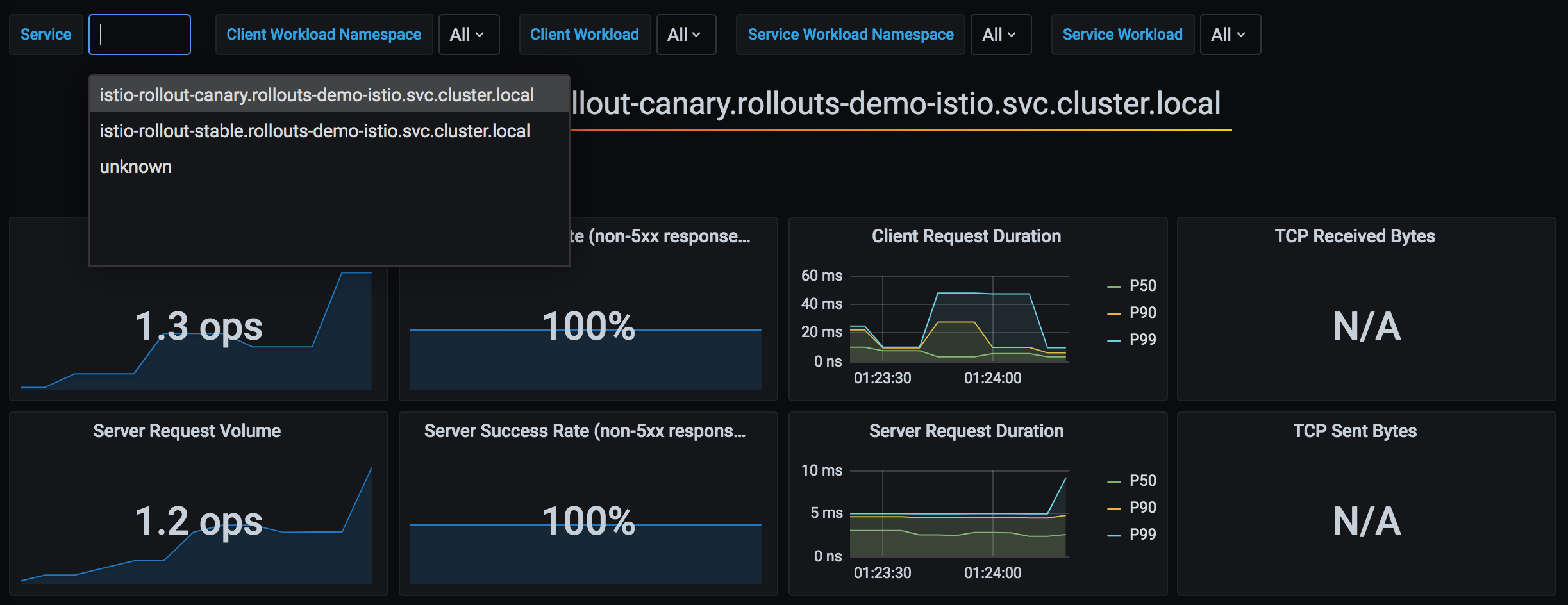
*来源:*[*Argo Rollouts 官方文档*](https://argo-rollouts.readthedocs.io/en/stable/features/traffic-management/istio/)
### 1. 基本分析集成
```yaml
apiVersion: argoproj.io/v1alpha1
kind: Rollout
spec:
strategy:
canary:
analysis:
templates:
- templateName: success-rate
args:
- name: service-name
value: test
steps:
- setWeight: 10
- pause: {duration: 5m}
- analysis: # ← Analysis runs at this step
templates:
- templateName: success-rate
args:
- name: service-name
value: test
- setWeight: 50
```
### 2. 后台分析
```yaml
spec:
strategy:
canary:
analysis:
templates:
- templateName: success-rate
startingStep: 2 # Runs continuously in background from step 2
args:
- name: service-name
value: test
steps:
- setWeight: 10
- pause: {duration: 2m}
- setWeight: 30
- pause: {duration: 2m}
- setWeight: 50
```
**行为**:
```mermaid
flowchart TD
S1[Step 1: setWeight 10
Wait 2m]
S2[Step 2: setWeight 30
Wait 2m]
S3[Step 3: setWeight 50]
A1[Analysis Start]
A2[Measure every 30s]
A3[Immediate rollback on failure]
S1 --> S2
S2 --> S3
S2 --> A1
A1 --> A2
A2 --> A3
classDef steps fill:#326CE5,stroke:#333,stroke-width:1px,color:white;
classDef analysis fill:#FFA726,stroke:#333,stroke-width:2px,color:white;
class S1,S2,S3 steps;
class A1,A2,A3 analysis;
```
### 3. 复合指标分析
```yaml
apiVersion: argoproj.io/v1alpha1
kind: AnalysisTemplate
metadata:
name: comprehensive-analysis
spec:
args:
- name: service-name
- name: canary-hash
metrics:
# Metric 1: Success rate
- name: success-rate
interval: 30s
count: 5
successCondition: result >= 0.95
failureLimit: 2
provider:
prometheus:
address: http://prometheus.istio-system:9090
query: |
sum(rate(
istio_requests_total{
destination_service_name="{{args.service-name}}",
destination_workload_label_rollouts_pod_template_hash="{{args.canary-hash}}",
response_code!~"5.*"
}[2m]
))
/
sum(rate(
istio_requests_total{
destination_service_name="{{args.service-name}}",
destination_workload_label_rollouts_pod_template_hash="{{args.canary-hash}}"
}[2m]
))
# Metric 2: P95 Latency
- name: latency-p95
interval: 30s
count: 5
successCondition: result <= 0.5 # 500ms or less
failureLimit: 2
provider:
prometheus:
address: http://prometheus.istio-system:9090
query: |
histogram_quantile(0.95,
sum(rate(
istio_request_duration_milliseconds_bucket{
destination_service_name="{{args.service-name}}",
destination_workload_label_rollouts_pod_template_hash="{{args.canary-hash}}"
}[2m]
)) by (le)
) / 1000
# Metric 3: Error rate
- name: error-rate
interval: 30s
count: 5
successCondition: result <= 0.01 # 1% or less
failureLimit: 2
provider:
prometheus:
address: http://prometheus.istio-system:9090
query: |
sum(rate(
istio_requests_total{
destination_service_name="{{args.service-name}}",
destination_workload_label_rollouts_pod_template_hash="{{args.canary-hash}}",
response_code=~"5.*"
}[2m]
))
/
sum(rate(
istio_requests_total{
destination_service_name="{{args.service-name}}",
destination_workload_label_rollouts_pod_template_hash="{{args.canary-hash}}"
}[2m]
))
```
### 4. 部署前/后分析
```yaml
spec:
strategy:
canary:
# Pre-analysis (before deployment)
analysis:
templates:
- templateName: pre-deployment-check
args:
- name: service-name
value: test
steps:
- setWeight: 10
- pause: {duration: 5m}
- setWeight: 50
# Post-analysis (after deployment)
analysis:
templates:
- templateName: post-deployment-check
args:
- name: service-name
value: test
```
## 高级部署模式
### 1. Blue/Green 部署
```yaml
apiVersion: argoproj.io/v1alpha1
kind: Rollout
metadata:
name: test
spec:
replicas: 3
strategy:
blueGreen:
# Preview/Active Service specification
previewService: test-preview
activeService: test-active
# Auto promotion (default: manual)
autoPromotionEnabled: false
# Pre-analysis
prePromotionAnalysis:
templates:
- templateName: smoke-test
# Post-analysis
postPromotionAnalysis:
templates:
- templateName: comprehensive-analysis
args:
- name: service-name
value: test
# Previous version retention time
scaleDownDelaySeconds: 600 # Delete previous version after 10 minutes
```
**VirtualService(Blue/Green)**:
```yaml
apiVersion: networking.istio.io/v1
kind: VirtualService
metadata:
name: test
spec:
http:
- route:
- destination:
host: test-active # ← Auto switched by Rollout
weight: 100
```
**操作流程**:
```mermaid
flowchart TD
Start[Start new version deployment]
Start --> Preview[Deploy to Preview environment]
Preview --> PreAnalysis{Pre-analysis
smoke-test}
PreAnalysis -->|Failure| Abort1[Deployment abort]
PreAnalysis -->|Success| Wait[Wait for manual approval
autoPromotion=false]
Wait -->|promote command| Switch[Active Service switch
Blue → Green]
Switch --> PostAnalysis{Post-analysis
comprehensive}
PostAnalysis -->|Failure| Rollback[Rollback to previous version
Green → Blue]
PostAnalysis -->|Success| Scale[Delete previous version after 10m]
Scale --> End[Deployment complete]
classDef success fill:#00C7B7,stroke:#333,stroke-width:2px,color:white;
classDef failure fill:#FF6B6B,stroke:#333,stroke-width:2px,color:white;
classDef check fill:#326CE5,stroke:#333,stroke-width:2px,color:white;
class End success;
class Abort1,Rollback failure;
class PreAnalysis,PostAnalysis check;
```
### 2. 使用 Experiment 的 Canary
**使用场景**:在 Canary 部署期间同时测试多个版本
```yaml
apiVersion: argoproj.io/v1alpha1
kind: Rollout
spec:
strategy:
canary:
steps:
- setWeight: 10
- pause: {duration: 2m}
# Experiment execution
- experiment:
duration: 10m
templates:
- name: canary-v2
specRef: canary
weight: 10
- name: experimental-v3
specRef: experimental
weight: 5
analyses:
- name: compare-versions
templateName: version-comparison
- setWeight: 50
- pause: {duration: 5m}
```
### 3. 渐进式 Rollout
```yaml
spec:
strategy:
canary:
# Very slow rollout
steps:
- setWeight: 1 # Start from 1%
- pause: {duration: 1h}
- setWeight: 5
- pause: {duration: 1h}
- setWeight: 10
- pause: {duration: 2h}
- setWeight: 25
- pause: {duration: 4h}
- setWeight: 50
- pause: {duration: 8h}
- setWeight: 75
- pause: {duration: 8h}
# 100% (total 24+ hours)
# Background Analysis
analysis:
templates:
- templateName: comprehensive-analysis
startingStep: 1
```
## 故障排除
### 1. VirtualService 未更新
**症状**:
```bash
kubectl argo rollouts get rollout test
# Status: ॥ Paused
# Message: CannotUpdateVirtualService: ...
```
**原因**:
* VirtualService 不存在
* 路由名称不正确
* 未安装 Istio
**解决方案**:
```bash
# 1. Check VirtualService
kubectl get virtualservice test -o yaml
# 2. Check route name
kubectl get virtualservice test -o jsonpath='{.spec.http[*].name}'
# 3. Check Rollout configuration
kubectl get rollout test -o jsonpath='{.spec.strategy.canary.trafficRouting.istio}'
```
### 2. Canary Pod 未接收流量
**症状**:即使 setWeight: 10,Canary Pod 仍没有流量
**原因**:
* DestinationRule Subset 配置错误
* Service selector 未找到 Pod
**验证**:
```bash
# 1. Check pod labels
kubectl get pods -l app=test --show-labels
# Output:
# NAME LABELS
# test-abc123-xyz app=test,rollouts-pod-template-hash=abc123
# test-def456-xyz app=test,rollouts-pod-template-hash=def456
# 2. Check if Canary Service selects correct pods
kubectl get endpoints test-canary
# 3. Check VirtualService → DestinationRule → Service path
istioctl proxy-config clusters | grep test
```
### 3. 分析失败
**症状**:
```bash
kubectl get analysisrun
# NAME STATUS AGE
# test-abc123-1 Failed 5m
```
**验证**:
```bash
# Check Analysis logs
kubectl describe analysisrun test-abc123-1
# Test Prometheus query
kubectl port-forward -n istio-system svc/prometheus 9090:9090
# Run query in browser
# http://localhost:9090/graph
```
**常见问题**:
* Prometheus 地址不正确
* 指标不存在(流量不足)
* 查询语法错误
### 4. 回滚不起作用
**症状**:`kubectl argo rollouts abort` 不起作用
**原因**:所有步骤均已完成(100%)
**解决方案**:
```bash
# 1. Check current status
kubectl argo rollouts status test
# 2. Revert to previous version
kubectl argo rollouts undo test
# Or to specific revision
kubectl argo rollouts undo test --to-revision=2
```
### 5. 调试命令
```bash
# 1. Rollout status (detailed)
kubectl argo rollouts get rollout test
# 2. Rollout events
kubectl describe rollout test
# 3. Check ReplicaSet
kubectl get replicaset -l app=test
# 4. Check VirtualService weight
kubectl get virtualservice test -o yaml | grep -A 10 "name: primary"
# 5. Check Istio proxy configuration
istioctl proxy-config route --name 8080
# 6. Check AnalysisRun
kubectl get analysisrun -l rollout=test
# 7. Rollout Controller logs
kubectl logs -n argo-rollouts deployment/argo-rollouts
```
## 最佳实践
### 1. 部署步骤设计
**推荐步骤**:
```yaml
steps:
- setWeight: 5 # Very small start
pause: {duration: 5m}
- setWeight: 10 # Small-scale verification
pause: {duration: 10m}
- setWeight: 25 # Meaningful traffic
pause: {duration: 15m}
- setWeight: 50 # Half transition
pause: {duration: 30m}
- setWeight: 75 # Most transition
pause: {duration: 30m}
# 100% auto complete
```
**原则**:
* ✅ 从小步骤开始(5-10%)
* ✅ 每个步骤都留出充足的验证时间
* ✅ 50% 后等待更长时间(此时流量占大部分)
* ✅ 快速迁移最后 20-30% 的流量
### 2. 分析配置
```yaml
metrics:
- name: success-rate
interval: 30s # Not too short (minimum 30s)
count: 5 # Sufficient samples (minimum 5)
successCondition: result >= 0.95 # Reasonable threshold
failureLimit: 2 # Don't fail immediately
```
**原则**:
* ✅ 组合使用多个指标(成功率 + 延迟 + 错误率)
* ✅ 保留足够的测量时间(至少 2-3 分钟)
* ✅ 使用 `failureLimit` 容许临时错误
* ✅ 使用后台 Analysis 监控整个部署过程
### 3. Service 配置
```yaml
# ❌ Wrong example: version label in selector
apiVersion: v1
kind: Service
metadata:
name: test-stable
spec:
selector:
app: test
version: v1 # ← Wrong! Should use hash managed by Rollout
---
# ✅ Correct example: Rollout manages hash
apiVersion: v1
kind: Service
metadata:
name: test-stable
spec:
selector:
app: test
# rollouts-pod-template-hash is auto-added
```
### 4. 资源管理
```yaml
spec:
revisionHistoryLimit: 2 # Minimum 2 (for rollback)
progressDeadlineSeconds: 600 # 10 minute timeout
template:
spec:
containers:
- name: app
resources:
requests:
cpu: 100m
memory: 128Mi
limits:
cpu: 200m # 2x of request
memory: 256Mi # 2x of request
```
### 5. HA 配置
```yaml
spec:
replicas: 3 # Minimum 3 (1 per AZ)
strategy:
canary:
maxSurge: 1 # Maximum 1 extra pod
maxUnavailable: 0 # Maintain minimum replicas
```
**PodDisruptionBudget**:
```yaml
apiVersion: policy/v1
kind: PodDisruptionBudget
metadata:
name: test-pdb
spec:
minAvailable: 2 # Maintain minimum 2
selector:
matchLabels:
app: test
```
### 6. 部署检查清单
部署前:
* [ ] 已创建 Stable/Canary Service
* [ ] 已创建 VirtualService 和 DestinationRule
* [ ] 已定义 AnalysisTemplate
* [ ] 已验证 Prometheus 指标收集
* [ ] 已检查 Rollout 步骤
部署期间:
* [ ] 使用 `kubectl argo rollouts get rollout --watch` 监控
* [ ] 验证 Canary Pod 是否接收流量
* [ ] 确认 Analysis 指标正常
* [ ] 监控错误日志
部署后:
* [ ] 确认已完成 100% 迁移
* [ ] 验证先前的 ReplicaSet 已删除
* [ ] 最终指标验证
### 7. 渐进式采用
**步骤 1**:基本 Canary
```yaml
steps:
- setWeight: 10
- pause: {} # Manual approval
```
**步骤 2**:添加自动 Analysis
```yaml
steps:
- setWeight: 10
- pause: {duration: 5m}
- analysis:
templates:
- templateName: success-rate
```
**步骤 3**:后台 Analysis
```yaml
analysis:
templates:
- templateName: success-rate
startingStep: 1
```
**步骤 4**:复合指标
```yaml
analysis:
templates:
- templateName: comprehensive-analysis # Success rate + latency + error rate
```
## 参考资料
### 相关文档
* [流量拆分 - Canary 部署](https://github.com/Atom-oh/kubernetes-docs/tree/main/cn/service-mesh/istio/traffic-management/04-traffic-splitting.md)
* [区域感知 Argo Rollouts](/kubernetes/es/fu-wu-wang-ge/istio/advanced/09-zone-aware-argo-rollouts.md)
* [VirtualService](/kubernetes/es/fu-wu-wang-ge/istio/traffic-management/01-gateway-virtualservice.md)
* [DestinationRule](/kubernetes/es/fu-wu-wang-ge/istio/traffic-management/03-destination-rule.md)
### 外部链接
* [Argo Rollouts 官方文档](https://argo-rollouts.readthedocs.io/)
* [Istio 流量管理](https://argo-rollouts.readthedocs.io/en/stable/features/traffic-management/istio/)
* [AnalysisTemplate 示例](https://github.com/argoproj/argo-rollouts/tree/master/examples)
## 后续步骤
1. [区域感知 Rollout 实施](/kubernetes/es/fu-wu-wang-ge/istio/advanced/09-zone-aware-argo-rollouts.md)