> For the complete documentation index, see [llms.txt](https://atomoh.gitbook.io/kubernetes/llms.txt). Markdown versions of documentation pages are available by appending `.md` to page URLs; this page is available as [Markdown](https://atomoh.gitbook.io/kubernetes/jp/sbisumesshu/istio/security.md).
# セキュリティ
> **対応バージョン**: Istio 1.28 **最終更新**: February 19, 2026
Istio は、service mesh 内で堅牢なセキュリティ機能を提供します。Zero Trust セキュリティモデルに基づき、サービス間通信を自動的に暗号化し、きめ細かなアクセス制御を提供します。
## 目次
1. [セキュリティアーキテクチャの概要](#security-architecture-overview)
2. [主要なセキュリティ機能](#core-security-features)
3. [セキュリティコンポーネント](#security-components)
4. [詳細ドキュメント](#detailed-documentation)
5. [セキュリティのベストプラクティス](#security-best-practices)
6. [セキュリティモニタリング](#security-monitoring)
## セキュリティアーキテクチャの概要
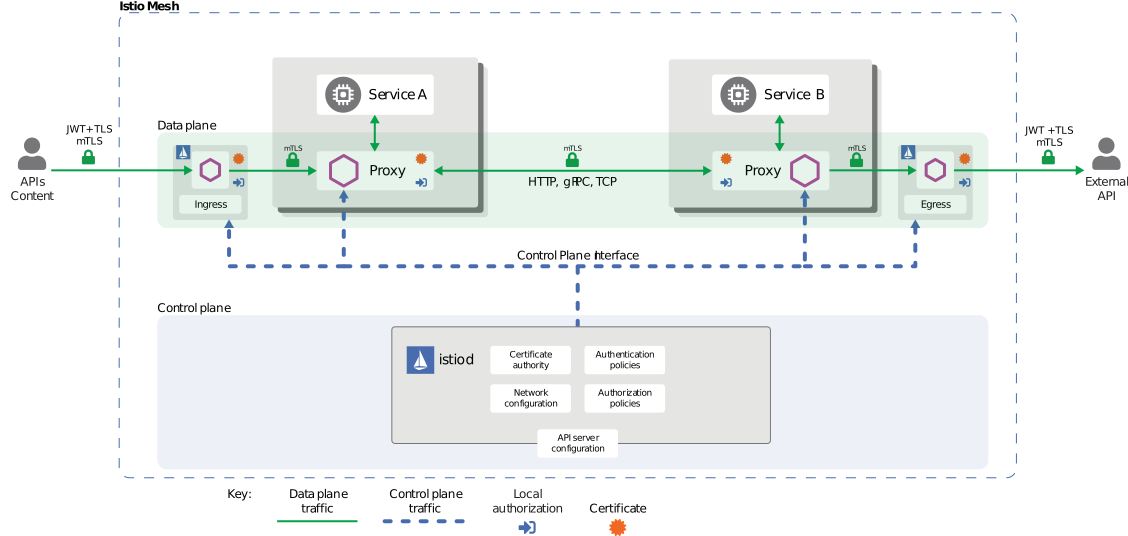
Istio は、service mesh 内のすべての通信を保護するために、**Zero Trust セキュリティモデル**を実装します。セキュリティアーキテクチャは、4 つの主要なレイヤーで構成されています。
### セキュリティアーキテクチャのレイヤー
```mermaid
flowchart TB
subgraph ControlPlane["Control Plane (istiod)"]
CA[Certificate Authority
CA Certificate Management]
ConfigAPI[Config API
Security Policy Distribution]
end
subgraph DataPlane["Data Plane (Envoy Proxy)"]
subgraph Pod1["Pod A"]
App1[Application]
Envoy1[Envoy Sidecar
- mTLS Termination
- Policy Enforcement]
end
subgraph Pod2["Pod B"]
Envoy2[Envoy Sidecar
- mTLS Termination
- Policy Enforcement]
App2[Application]
end
end
subgraph SecurityLayers["Security Layers"]
Identity[1. Identity
SPIFFE ID Based]
CertMgmt[2. Certificate Management
Auto Issuance/Renewal]
PeerAuth[3. Peer Authentication
Service-to-Service mTLS]
ReqAuth[4. Request Authentication
End-User JWT]
AuthZ[5. Authorization
Access Control]
end
CA -.->|Certificate Issuance| Envoy1
CA -.->|Certificate Issuance| Envoy2
ConfigAPI -.->|Policy Distribution| Envoy1
ConfigAPI -.->|Policy Distribution| Envoy2
App1 -->|Plaintext| Envoy1
Envoy1 <-->|mTLS Encrypted| Envoy2
Envoy2 -->|Plaintext| App2
Identity --> CertMgmt
CertMgmt --> PeerAuth
PeerAuth --> ReqAuth
ReqAuth --> AuthZ
%% Style definitions
classDef control fill:#FF9900,stroke:#333,stroke-width:2px,color:black;
classDef app fill:#00C7B7,stroke:#333,stroke-width:1px,color:white;
classDef proxy fill:#3B48CC,stroke:#333,stroke-width:2px,color:white;
classDef security fill:#326CE5,stroke:#333,stroke-width:1px,color:white;
%% Class applications
class CA,ConfigAPI control;
class App1,App2 app;
class Envoy1,Envoy2 proxy;
class Identity,CertMgmt,PeerAuth,ReqAuth,AuthZ security;
```
**主要なアーキテクチャコンポーネント**:
1. **Control Plane (istiod)**
* Certificate Authority (CA): X.509 証明書の発行と管理
* Configuration API: セキュリティポリシーの配布と管理
* Service Discovery: Workload identity の管理
2. **Data Plane (Envoy Proxy)**
* mTLS Termination Points: サービス間の暗号化通信
* Policy Enforcement: 認証/認可ポリシーの適用
* Security Telemetry: セキュリティメトリクスの収集
3. **アイデンティティ管理**
* SPIFFE 標準に基づく強力なアイデンティティ管理
* Kubernetes ServiceAccount との統合
* 証明書の自動更新(デフォルトは 24 時間)
4. **ポリシーエンジン**
* 宣言型セキュリティポリシー(CRD ベース)
* きめ細かなアクセス制御(RBAC)
* 監査ログのサポート
## 主要なセキュリティ機能
Istio は、以下の主要なセキュリティ機能を提供します。
### 1. 通信セキュリティ(mTLS)
すべてのサービス間通信は自動的に暗号化されます。Istio は、**PERMISSIVE** モードによる段階的な移行をサポートします。
```yaml
apiVersion: security.istio.io/v1
kind: PeerAuthentication
metadata:
name: default
namespace: istio-system
spec:
mtls:
mode: STRICT # Production: STRICT, Migration: PERMISSIVE
```
**モードの説明**:
* **STRICT**: mTLS のみ許可(本番環境に推奨)
* **PERMISSIVE**: mTLS と平文の両方を許可(移行用)
* **DISABLE**: mTLS を無効化
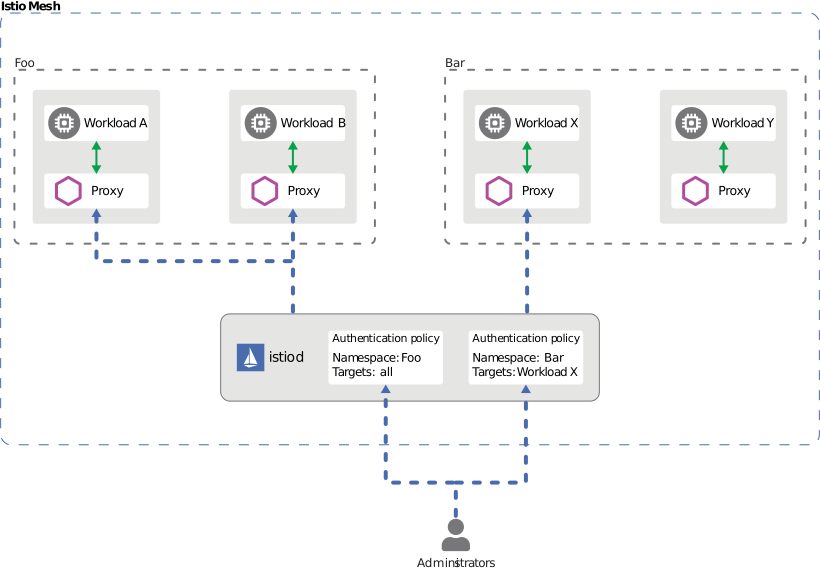
### 2. 認証
Istio は 2 層の認証を提供します。
* **Peer Authentication**: サービス間認証(mTLS + SPIFFE ID)
* **Request Authentication**: エンドユーザー認証(JWT + OAuth/OIDC)
**例**:
```yaml
# Request Authentication (JWT)
apiVersion: security.istio.io/v1
kind: RequestAuthentication
metadata:
name: jwt-auth
spec:
jwtRules:
- issuer: "https://accounts.google.com"
jwksUri: "https://www.googleapis.com/oauth2/v3/certs"
```
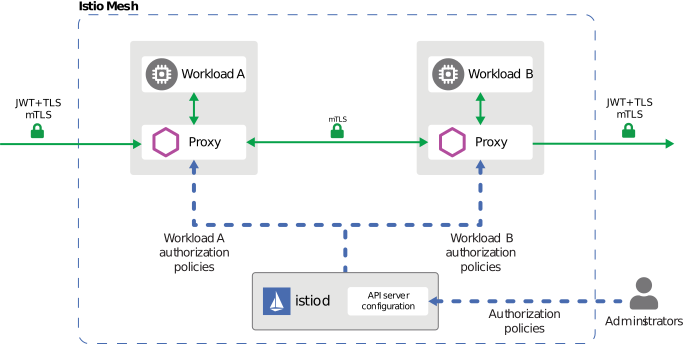
### 3. 認可
きめ細かなアクセス制御ポリシーが適用されます。AuthorizationPolicy は、以下に基づいて制御します。
* Service Account / Namespace
* HTTP Method / Path
* IP Address
* JWT Claims
```yaml
apiVersion: security.istio.io/v1
kind: AuthorizationPolicy
metadata:
name: allow-read
spec:
action: ALLOW
rules:
- from:
- source:
principals: ["cluster.local/ns/default/sa/myapp"]
to:
- operation:
methods: ["GET"]
paths: ["/api/*"]
```
## セキュリティのベストプラクティス
### 1. 多層防御
複数のレイヤーでセキュリティを適用し、多層防御を実装します。
**ネットワークレイヤー**:
```yaml
# 1. Enable mTLS STRICT mode
apiVersion: security.istio.io/v1
kind: PeerAuthentication
metadata:
name: default
namespace: istio-system
spec:
mtls:
mode: STRICT
```
**アプリケーションレイヤー**:
```yaml
# 2. Enable JWT authentication
apiVersion: security.istio.io/v1
kind: RequestAuthentication
metadata:
name: require-jwt
spec:
jwtRules:
- issuer: "https://your-auth-provider.com"
jwksUri: "https://your-auth-provider.com/.well-known/jwks.json"
```
**アクセス制御レイヤー**:
```yaml
# 3. Default deny policy
apiVersion: security.istio.io/v1
kind: AuthorizationPolicy
metadata:
name: deny-all
spec:
action: DENY
rules:
- {}
---
# 4. Allow only required access
apiVersion: security.istio.io/v1
kind: AuthorizationPolicy
metadata:
name: allow-specific
spec:
action: ALLOW
rules:
- from:
- source:
principals: ["cluster.local/ns/frontend/sa/webapp"]
to:
- operation:
methods: ["GET", "POST"]
```
### 2. 最小権限の原則
* 各サービスには必要最小限の権限のみを付与する
* ServiceAccount をきめ細かく分離する
* Namespace の分離を活用する
### 3. セキュリティモニタリング
* Istio Access Logs を有効にする
* Prometheus でセキュリティメトリクスを収集する
* Kiali で mTLS ステータスを監視する
## 次のステップ
1. [**mTLS**](/kubernetes/jp/sbisumesshu/istio/security/01-mtls.md): サービス間暗号化とアイデンティティ管理
2. [**認証**](/kubernetes/jp/sbisumesshu/istio/security/02-authentication.md): JWT と OAuth/OIDC の統合
3. [**認可**](/kubernetes/jp/sbisumesshu/istio/security/03-authorization.md): きめ細かなアクセス制御ポリシー
## 参考資料
### 公式ドキュメント
* [Istio Security Concepts](https://istio.io/latest/docs/concepts/security/)
* [Security Best Practices](https://istio.io/latest/docs/ops/best-practices/security/)
* [Security Reference](https://istio.io/latest/docs/reference/config/security/)
### 関連標準
* [SPIFFE Specification](https://github.com/spiffe/spiffe)
* [OAuth 2.0 / OIDC](https://oauth.net/2/)
* [JWT (RFC 7519)](https://datatracker.ietf.org/doc/html/rfc7519)
## クイズ
この章で学んだ内容を確認するには、[Istio Security Quiz](https://github.com/Atom-oh/kubernetes-docs/tree/main/jp/quizzes/service-mesh/istio/security.md)に挑戦してください。