> For the complete documentation index, see [llms.txt](https://atomoh.gitbook.io/kubernetes/llms.txt). Markdown versions of documentation pages are available by appending `.md` to page URLs; this page is available as [Markdown](https://atomoh.gitbook.io/kubernetes/service-mesh/istio/advanced/08-argo-rollouts.md).
# Argo Rollouts 통합
> **지원 버전**: Argo Rollouts 1.6+, Istio 1.18+ **마지막 업데이트**: 2026년 2월 19일 **난이도**: ⭐⭐⭐⭐ (고급)
이 문서는 Argo Rollouts와 Istio Service Mesh를 통합하여 Progressive Delivery를 구현하는 방법을 상세히 설명합니다.
## 목차
1. [개요](#개요)
2. [아키텍처](#아키텍처)
3. [핵심 개념](#핵심-개념)
4. [설정 및 구성](#설정-및-구성)
5. [트래픽 라우팅 전략](#트래픽-라우팅-전략)
6. [Analysis 및 메트릭](#analysis-및-메트릭)
7. [고급 배포 패턴](#고급-배포-패턴)
8. [문제 해결](#문제-해결)
9. [모범 사례](#모범-사례)
## 개요
### Argo Rollouts란?
Argo Rollouts는 Kubernetes를 위한 Progressive Delivery 컨트롤러로, 고급 배포 전략을 제공합니다:
* **Canary 배포**: 점진적 트래픽 전환
* **Blue/Green 배포**: 즉시 전환 및 롤백
* **분석 기반 자동화**: 메트릭 기반 자동 진행/롤백
* **트래픽 관리 통합**: Istio, Nginx, ALB 등 지원
### Istio 통합의 장점
```mermaid
flowchart LR
subgraph "Without Argo Rollouts"
direction TB
D1[Deployment v1
100%]
D2[Deployment v2
0%]
Manual[수동 트래픽 조정
VirtualService 직접 수정]
D1 --> Manual
D2 --> Manual
end
subgraph "With Argo Rollouts + Istio"
direction TB
R1[Rollout
자동 버전 관리]
Auto[자동 트래픽 조정
메트릭 기반 진행]
Analysis[Analysis
성공률/레이턴시 검증]
R1 --> Auto
Auto --> Analysis
end
classDef manual fill:#FFB74D,stroke:#333,stroke-width:2px,color:black;
classDef auto fill:#00C7B7,stroke:#333,stroke-width:2px,color:white;
class Manual manual;
class R1,Auto,Analysis auto;
```
**주요 이점**:
* ✅ **자동화된 Canary 배포**: VirtualService weight 자동 조정
* ✅ **메트릭 기반 검증**: Prometheus 메트릭으로 자동 진행/롤백
* ✅ **세밀한 트래픽 제어**: Istio의 L7 라우팅 활용
* ✅ **무중단 배포**: 트래픽 전환 중 다운타임 없음
* ✅ **자동 롤백**: 에러율 증가 시 자동 롤백
### 지원하는 Istio 리소스
| 리소스 | 용도 | Argo Rollouts 관리 |
| ------------------- | ------------------- | ---------------------- |
| **VirtualService** | 트래픽 라우팅 규칙 | ✅ routes의 weight 자동 조정 |
| **DestinationRule** | Subset 정의 | ⚠️ 수동 생성 필요 |
| **Service** | Stable/Canary 엔드포인트 | ⚠️ 수동 생성 필요 |
## 아키텍처
### 전체 아키텍처
```mermaid
flowchart TB
subgraph "Control Plane"
ArgoCD[ArgoCD
GitOps 배포]
Rollouts[Argo Rollouts
Controller]
Istiod[Istiod
Istio Control Plane]
end
subgraph "Data Plane"
direction TB
subgraph "Istio Ingress Gateway"
Gateway[Gateway
외부 트래픽]
end
subgraph "VirtualService (test)"
VS[VirtualService
라우팅 규칙]
end
subgraph "Services"
StableService[test-stable
Service]
CanaryService[test-canary
Service]
end
subgraph "Rollout Managed Pods"
StablePods[Stable Pods
v1]
CanaryPods[Canary Pods
v2]
end
subgraph "DestinationRule"
DR[DestinationRule
Subsets]
end
end
subgraph "Observability"
Prometheus[Prometheus
메트릭 수집]
AnalysisRun[AnalysisRun
메트릭 검증]
end
ArgoCD -->|배포| Rollouts
Rollouts -->|VirtualService weight 조정| VS
Rollouts -->|ReplicaSet 관리| StablePods
Rollouts -->|ReplicaSet 관리| CanaryPods
Rollouts -->|AnalysisRun 생성| AnalysisRun
Gateway --> VS
VS -->|90% stable subset| DR
VS -->|10% canary subset| DR
DR --> StableService
DR --> CanaryService
StableService --> StablePods
CanaryService --> CanaryPods
Istiod -.->|xDS Config| Gateway
Istiod -.->|설정 동기화| VS
Istiod -.->|설정 동기화| DR
StablePods -.->|메트릭| Prometheus
CanaryPods -.->|메트릭| Prometheus
Prometheus -->|쿼리| AnalysisRun
AnalysisRun -.->|성공/실패| Rollouts
classDef control fill:#E6522C,stroke:#333,stroke-width:2px,color:white;
classDef routing fill:#326CE5,stroke:#333,stroke-width:2px,color:white;
classDef app fill:#00C7B7,stroke:#333,stroke-width:2px,color:white;
classDef observ fill:#FFA726,stroke:#333,stroke-width:2px,color:white;
class ArgoCD,Rollouts,Istiod control;
class Gateway,VS,DR,StableService,CanaryService routing;
class StablePods,CanaryPods app;
class Prometheus,AnalysisRun observ;
```
### 트래픽 흐름
```mermaid
sequenceDiagram
autonumber
participant User as 사용자
participant Gateway as Istio Gateway
participant VS as VirtualService
participant Stable as Stable Pod (v1)
participant Canary as Canary Pod (v2)
participant Rollouts as Argo Rollouts
participant Prom as Prometheus
Note over User,Prom: 초기 상태: v1 100%
Rollouts->>VS: setWeight: 10
stable: 90%, canary: 10%
User->>Gateway: HTTP 요청
Gateway->>VS: 트래픽 전달
alt 90% 트래픽
VS->>Stable: subset: stable
Stable->>VS: 응답
else 10% 트래픽
VS->>Canary: subset: canary
Canary->>VS: 응답
end
VS->>Gateway: 응답
Gateway->>User: 응답
Stable->>Prom: 메트릭 (성공률, 레이턴시)
Canary->>Prom: 메트릭 (성공률, 레이턴시)
Rollouts->>Prom: Analysis 쿼리
(Canary 성공률 >= 95%?)
Prom->>Rollouts: 메트릭 결과
alt 성공률 >= 95%
Rollouts->>VS: setWeight: 50
자동 진행
else 성공률 < 95%
Rollouts->>VS: setWeight: 0
자동 롤백
end
```
## 핵심 개념
### 1. Rollout 리소스
Rollout은 Deployment를 대체하는 커스텀 리소스로, 고급 배포 전략을 지원합니다.
**Deployment와 비교**:
| 기능 | Deployment | Rollout |
| -------------- | --------------- | ------------------- |
| **기본 롤아웃** | ✅ RollingUpdate | ✅ RollingUpdate |
| **Canary 배포** | ❌ | ✅ 트래픽 가중치 제어 |
| **Blue/Green** | ❌ | ✅ 즉시 전환 |
| **분석 기반 자동화** | ❌ | ✅ AnalysisTemplate |
| **트래픽 관리 통합** | ❌ | ✅ Istio, Nginx, ALB |
| **자동 롤백** | ❌ | ✅ 메트릭 기반 |
### 2. VirtualService 관리 방식
**중요**: Argo Rollouts는 지정된 route 이름의 **전체 destinations 배열을 덮어씁니다**.
```yaml
# VirtualService 초기 상태
apiVersion: networking.istio.io/v1
kind: VirtualService
metadata:
name: test
spec:
http:
- name: primary # Rollout이 관리하는 route
route:
- destination: {host: test, subset: stable}
weight: 100
- destination: {host: test, subset: canary}
weight: 0
```
**Rollout 설정**:
```yaml
apiVersion: argoproj.io/v1alpha1
kind: Rollout
spec:
strategy:
canary:
trafficRouting:
istio:
virtualService:
name: test # VirtualService 이름
routes:
- primary # 관리할 route 이름
destinationRule:
name: test # DestinationRule 이름
canarySubsetName: canary
stableSubsetName: stable
steps:
- setWeight: 10 # → VirtualService의 primary route를 수정
```
**setWeight: 10 실행 시**:
```yaml
# Argo Rollouts가 자동으로 수정
http:
- name: primary
route:
- destination: {host: test, subset: stable}
weight: 90 # ← 자동 조정
- destination: {host: test, subset: canary}
weight: 10 # ← 자동 조정
```
**주의사항**:
* ⚠️ 여러 Rollout이 같은 route 이름을 참조하면 충돌 발생
* ⚠️ Rollout은 route의 **모든 destination**을 관리
* ⚠️ Subset 이름이 다르더라도 같은 route는 공유 불가
### 3. Subset과 Service
**DestinationRule Subset**:
```yaml
apiVersion: networking.istio.io/v1
kind: DestinationRule
metadata:
name: test
spec:
host: test # Service 이름과 일치
subsets:
- name: stable
labels: {} # ← 빈 레이블 (Service selector 사용)
- name: canary
labels: {} # ← 빈 레이블 (Service selector 사용)
```
**Stable/Canary Service**:
```yaml
# Stable Service
apiVersion: v1
kind: Service
metadata:
name: test-stable
spec:
selector:
app: test
# Rollout이 자동으로 추가하는 레이블
rollouts-pod-template-hash:
ports:
- port: 8080
---
# Canary Service
apiVersion: v1
kind: Service
metadata:
name: test-canary
spec:
selector:
app: test
# Rollout이 자동으로 추가하는 레이블
rollouts-pod-template-hash:
ports:
- port: 8080
```
**동작 방식**:
1. Rollout이 새 버전 배포 시 새로운 `rollouts-pod-template-hash` 레이블 생성
2. Canary 파드에 해당 hash 레이블 자동 추가
3. Canary Service가 해당 파드만 선택
4. Rollout 완료 시 Stable Service가 새 hash로 업데이트
### 4. Analysis 및 메트릭
**AnalysisTemplate**:
```yaml
apiVersion: argoproj.io/v1alpha1
kind: AnalysisTemplate
metadata:
name: success-rate
spec:
args:
- name: service-name
- name: canary-hash
metrics:
- name: success-rate
interval: 30s # 30초마다 측정
count: 5 # 5번 측정
successCondition: result >= 0.95 # 95% 이상이어야 성공
failureLimit: 2 # 2번 실패하면 전체 실패
provider:
prometheus:
address: http://prometheus.istio-system:9090
query: |
sum(rate(
istio_requests_total{
destination_service_name="{{args.service-name}}",
destination_workload_label_rollouts_pod_template_hash="{{args.canary-hash}}",
response_code!~"5.*"
}[2m]
))
/
sum(rate(
istio_requests_total{
destination_service_name="{{args.service-name}}",
destination_workload_label_rollouts_pod_template_hash="{{args.canary-hash}}"
}[2m]
))
```
**AnalysisRun**:
```mermaid
flowchart TD
Start[AnalysisRun 시작]
Start --> M1[측정 1: 30초 대기]
M1 --> C1{성공률 >= 95%?}
C1 -->|Yes| M2[측정 2: 30초 대기]
C1 -->|No| Fail1[실패 카운트 1]
M2 --> C2{성공률 >= 95%?}
C2 -->|Yes| M3[측정 3: 30초 대기]
C2 -->|No| Fail2[실패 카운트 2
전체 실패!]
M3 --> C3{성공률 >= 95%?}
C3 -->|Yes| M4[측정 4: 30초 대기]
C3 -->|No| Fail3[실패 카운트 2
전체 실패!]
M4 --> C4{성공률 >= 95%?}
C4 -->|Yes| M5[측정 5: 30초 대기]
M5 --> C5{성공률 >= 95%?}
C5 -->|Yes| Success[전체 성공!
다음 단계 진행]
Fail1 --> M2
Fail2 --> Rollback[자동 롤백]
Fail3 --> Rollback
classDef success fill:#00C7B7,stroke:#333,stroke-width:2px,color:white;
classDef failure fill:#FF6B6B,stroke:#333,stroke-width:2px,color:white;
classDef check fill:#326CE5,stroke:#333,stroke-width:1px,color:white;
class Success success;
class Fail2,Fail3,Rollback failure;
class C1,C2,C3,C4,C5 check;
```
## 설정 및 구성
### 필수 리소스 생성
#### 1. Rollout 리소스
```yaml
apiVersion: argoproj.io/v1alpha1
kind: Rollout
metadata:
name: test
namespace: default
spec:
replicas: 3
revisionHistoryLimit: 2 # 유지할 ReplicaSet 수
selector:
matchLabels:
app: test
template:
metadata:
labels:
app: test
spec:
containers:
- name: app
image: myapp:v1
ports:
- containerPort: 8080
resources:
requests:
cpu: 100m
memory: 128Mi
limits:
cpu: 200m
memory: 256Mi
strategy:
canary:
# Stable/Canary Service 지정
canaryService: test-canary
stableService: test-stable
# Istio 트래픽 라우팅
trafficRouting:
istio:
virtualService:
name: test # VirtualService 이름
routes:
- primary # 관리할 route 이름
destinationRule:
name: test # DestinationRule 이름
canarySubsetName: canary
stableSubsetName: stable
# 배포 단계
steps:
- setWeight: 10
- pause: {duration: 5m}
- setWeight: 20
- pause: {duration: 5m}
- setWeight: 50
- pause: {duration: 5m}
- setWeight: 80
- pause: {duration: 5m}
```
#### 2. Stable/Canary Service
```yaml
# Stable Service
apiVersion: v1
kind: Service
metadata:
name: test-stable
namespace: default
spec:
selector:
app: test
# rollouts-pod-template-hash는 Rollout이 자동 추가
ports:
- name: http
port: 8080
targetPort: 8080
---
# Canary Service
apiVersion: v1
kind: Service
metadata:
name: test-canary
namespace: default
spec:
selector:
app: test
# rollouts-pod-template-hash는 Rollout이 자동 추가
ports:
- name: http
port: 8080
targetPort: 8080
---
# 통합 Service (VirtualService가 참조)
apiVersion: v1
kind: Service
metadata:
name: test
namespace: default
spec:
selector:
app: test
ports:
- name: http
port: 8080
targetPort: 8080
```
#### 3. VirtualService
```yaml
apiVersion: networking.istio.io/v1
kind: VirtualService
metadata:
name: test
namespace: default
spec:
hosts:
- test
- test.default.svc.cluster.local
http:
- name: primary # Rollout이 관리하는 route
route:
- destination:
host: test
subset: stable
weight: 100 # ← Rollout이 자동 조정
- destination:
host: test
subset: canary
weight: 0 # ← Rollout이 자동 조정
```
#### 4. DestinationRule
```yaml
apiVersion: networking.istio.io/v1
kind: DestinationRule
metadata:
name: test
namespace: default
spec:
host: test
trafficPolicy:
loadBalancer:
simple: LEAST_REQUEST
subsets:
- name: stable
labels: {} # 빈 레이블 (Service selector 사용)
- name: canary
labels: {} # 빈 레이블 (Service selector 사용)
```
### 배포 워크플로우
```bash
# 1. 새 버전 배포
kubectl argo rollouts set image test app=myapp:v2
# 2. 상태 확인 (실시간 모니터링)
kubectl argo rollouts get rollout test --watch
# 출력 예시:
# Name: test
# Namespace: default
# Status: ॥ Paused
# Strategy: Canary
# Step: 1/8
# SetWeight: 10
# ActualWeight: 10
# Images: myapp:v1 (stable)
# myapp:v2 (canary)
# Replicas:
# Desired: 3
# Current: 4
# Updated: 1
# Ready: 4
# Available: 4
# 3. 다음 단계로 수동 진행 (pause 후)
kubectl argo rollouts promote test
# 4. 즉시 롤백 (문제 발생 시)
kubectl argo rollouts abort test
# 5. 롤백 후 재시도
kubectl argo rollouts retry rollout test
```
## 트래픽 라우팅 전략
### 1. 기본 Canary (가중치 기반)
```yaml
spec:
strategy:
canary:
steps:
- setWeight: 10 # 10% 트래픽
- pause: {duration: 5m}
- setWeight: 30
- pause: {duration: 5m}
- setWeight: 50
- pause: {duration: 10m}
- setWeight: 80
- pause: {duration: 10m}
# 100% 자동 전환
```
**트래픽 전환 그래프**:
```mermaid
flowchart LR
T0[0%
Canary] --> T1[10%
5분 대기]
T1 --> T2[30%
5분 대기]
T2 --> T3[50%
10분 대기]
T3 --> T4[80%
10분 대기]
T4 --> T5[100%
완료]
classDef current fill:#00C7B7,stroke:#333,stroke-width:2px,color:white;
class T3 current;
```
### 2. Header 기반 라우팅
**사용 사례**: 특정 사용자 그룹(내부 테스터)에게만 Canary 버전 노출
```yaml
# VirtualService 설정
apiVersion: networking.istio.io/v1
kind: VirtualService
metadata:
name: test
spec:
http:
# 1순위: 헤더 매칭 (Beta 사용자 → Canary)
- name: header-route
match:
- headers:
x-beta-user:
exact: "true"
route:
- destination:
host: test
subset: canary
weight: 100
# 2순위: 일반 트래픽 (가중치 기반)
- name: primary
route:
- destination:
host: test
subset: stable
weight: 90
- destination:
host: test
subset: canary
weight: 10
```
```yaml
# Rollout 설정
spec:
strategy:
canary:
trafficRouting:
istio:
virtualService:
name: test
routes:
- primary # primary route만 관리
steps:
- setWeight: 10
- pause: {duration: 5m}
- setWeight: 50
- pause: {duration: 10m}
```
**동작**:
* `x-beta-user: true` 헤더가 있는 요청 → 100% Canary
* 일반 요청 → Rollout이 관리하는 가중치 (10% → 50% → 100%)
### 3. Mirror Traffic (섀도우 테스팅)
**사용 사례**: 프로덕션 트래픽을 복사하여 Canary로 전송 (응답은 무시)
```yaml
apiVersion: networking.istio.io/v1
kind: VirtualService
metadata:
name: test
spec:
http:
- name: primary
route:
- destination:
host: test
subset: stable
weight: 100 # 실제 트래픽은 100% Stable
mirror:
host: test
subset: canary
mirrorPercentage:
value: 10.0 # 10%를 Canary로 복사 (응답 무시)
```
**특징**:
* ✅ 실제 사용자에게 영향 없음 (응답은 Stable에서만)
* ✅ 프로덕션 트래픽으로 Canary 성능/에러 검증
* ⚠️ Canary의 write 작업 주의 (데이터 중복 생성 가능)
### 4. 여러 route 관리
**사용 사례**: 여러 경로의 트래픽을 동시에 조정
```yaml
# VirtualService 설정
apiVersion: networking.istio.io/v1
kind: VirtualService
metadata:
name: test
spec:
http:
- name: api-route # API 경로
match:
- uri:
prefix: /api
route:
- destination: {host: test, subset: stable}
weight: 100
- destination: {host: test, subset: canary}
weight: 0
- name: web-route # 웹 경로
match:
- uri:
prefix: /web
route:
- destination: {host: test, subset: stable}
weight: 100
- destination: {host: test, subset: canary}
weight: 0
```
```yaml
# Rollout 설정
spec:
strategy:
canary:
trafficRouting:
istio:
virtualService:
name: test
routes:
- api-route # 두 route 모두 관리
- web-route
steps:
- setWeight: 10 # 두 route 모두 10%로 조정
```
## Analysis 및 메트릭
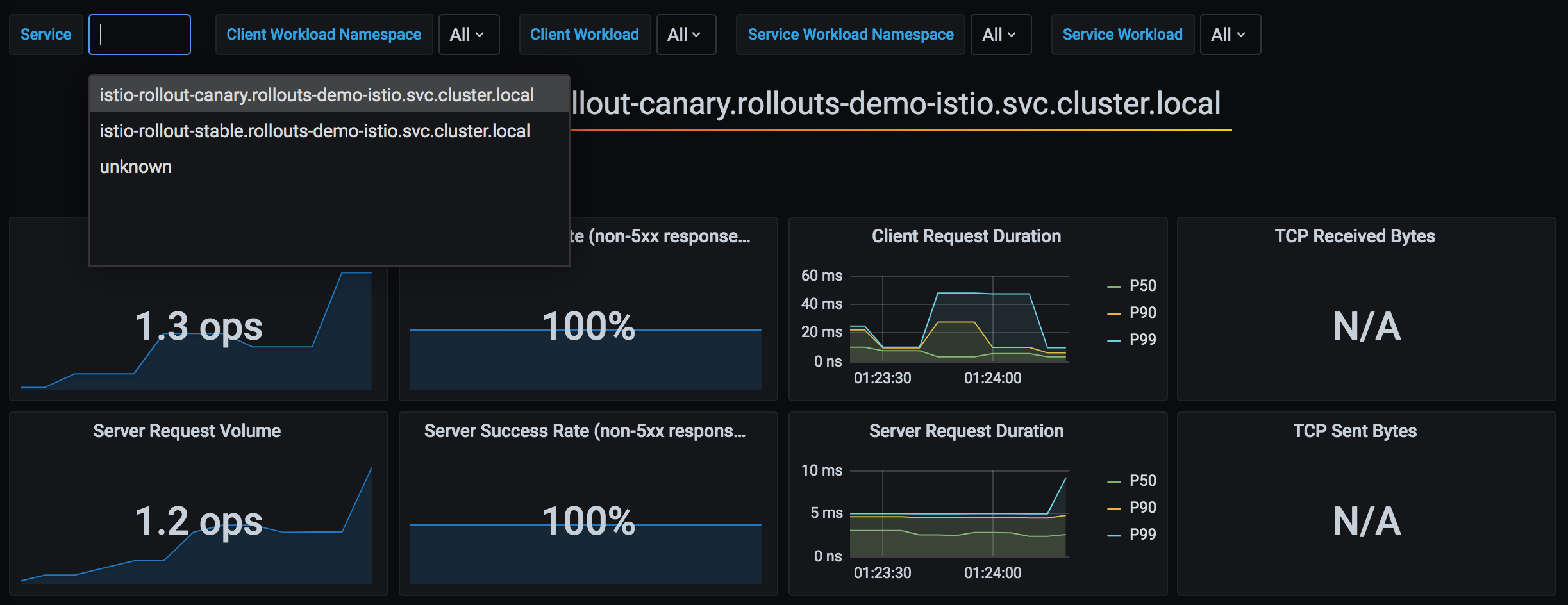
Argo Rollouts는 Istio가 수집하는 Prometheus 메트릭을 활용하여 Canary 배포의 성공 여부를 자동으로 판단합니다. 다음은 Argo Rollouts와 Istio 메트릭의 통합 아키텍처입니다:
*출처:* [*Argo Rollouts 공식 문서*](https://argo-rollouts.readthedocs.io/en/stable/features/traffic-management/istio/)
### 1. 기본 Analysis 통합
```yaml
apiVersion: argoproj.io/v1alpha1
kind: Rollout
spec:
strategy:
canary:
analysis:
templates:
- templateName: success-rate
args:
- name: service-name
value: test
steps:
- setWeight: 10
- pause: {duration: 5m}
- analysis: # ← 이 단계에서 Analysis 실행
templates:
- templateName: success-rate
args:
- name: service-name
value: test
- setWeight: 50
```
### 2. 백그라운드 Analysis
```yaml
spec:
strategy:
canary:
analysis:
templates:
- templateName: success-rate
startingStep: 2 # 2단계부터 백그라운드에서 계속 실행
args:
- name: service-name
value: test
steps:
- setWeight: 10
- pause: {duration: 2m}
- setWeight: 30
- pause: {duration: 2m}
- setWeight: 50
```
**동작**:
```mermaid
flowchart TD
S1[Step 1: setWeight 10
2분 대기]
S2[Step 2: setWeight 30
2분 대기]
S3[Step 3: setWeight 50]
A1[Analysis 시작]
A2[30초마다 측정]
A3[실패 시 즉시 롤백]
S1 --> S2
S2 --> S3
S2 --> A1
A1 --> A2
A2 --> A3
classDef steps fill:#326CE5,stroke:#333,stroke-width:1px,color:white;
classDef analysis fill:#FFA726,stroke:#333,stroke-width:2px,color:white;
class S1,S2,S3 steps;
class A1,A2,A3 analysis;
```
### 3. 복합 메트릭 분석
```yaml
apiVersion: argoproj.io/v1alpha1
kind: AnalysisTemplate
metadata:
name: comprehensive-analysis
spec:
args:
- name: service-name
- name: canary-hash
metrics:
# 메트릭 1: 성공률
- name: success-rate
interval: 30s
count: 5
successCondition: result >= 0.95
failureLimit: 2
provider:
prometheus:
address: http://prometheus.istio-system:9090
query: |
sum(rate(
istio_requests_total{
destination_service_name="{{args.service-name}}",
destination_workload_label_rollouts_pod_template_hash="{{args.canary-hash}}",
response_code!~"5.*"
}[2m]
))
/
sum(rate(
istio_requests_total{
destination_service_name="{{args.service-name}}",
destination_workload_label_rollouts_pod_template_hash="{{args.canary-hash}}"
}[2m]
))
# 메트릭 2: P95 레이턴시
- name: latency-p95
interval: 30s
count: 5
successCondition: result <= 0.5 # 500ms 이하
failureLimit: 2
provider:
prometheus:
address: http://prometheus.istio-system:9090
query: |
histogram_quantile(0.95,
sum(rate(
istio_request_duration_milliseconds_bucket{
destination_service_name="{{args.service-name}}",
destination_workload_label_rollouts_pod_template_hash="{{args.canary-hash}}"
}[2m]
)) by (le)
) / 1000
# 메트릭 3: 에러율
- name: error-rate
interval: 30s
count: 5
successCondition: result <= 0.01 # 1% 이하
failureLimit: 2
provider:
prometheus:
address: http://prometheus.istio-system:9090
query: |
sum(rate(
istio_requests_total{
destination_service_name="{{args.service-name}}",
destination_workload_label_rollouts_pod_template_hash="{{args.canary-hash}}",
response_code=~"5.*"
}[2m]
))
/
sum(rate(
istio_requests_total{
destination_service_name="{{args.service-name}}",
destination_workload_label_rollouts_pod_template_hash="{{args.canary-hash}}"
}[2m]
))
```
### 4. 사전/사후 Analysis
```yaml
spec:
strategy:
canary:
# 사전 분석 (배포 전)
analysis:
templates:
- templateName: pre-deployment-check
args:
- name: service-name
value: test
steps:
- setWeight: 10
- pause: {duration: 5m}
- setWeight: 50
# 사후 분석 (배포 후)
analysis:
templates:
- templateName: post-deployment-check
args:
- name: service-name
value: test
```
## 고급 배포 패턴
### 1. Blue/Green 배포
```yaml
apiVersion: argoproj.io/v1alpha1
kind: Rollout
metadata:
name: test
spec:
replicas: 3
strategy:
blueGreen:
# Preview/Active Service 지정
previewService: test-preview
activeService: test-active
# 자동 승급 (기본: 수동)
autoPromotionEnabled: false
# 사전 분석
prePromotionAnalysis:
templates:
- templateName: smoke-test
# 사후 분석
postPromotionAnalysis:
templates:
- templateName: comprehensive-analysis
args:
- name: service-name
value: test
# 이전 버전 유지 시간
scaleDownDelaySeconds: 600 # 10분 후 이전 버전 삭제
```
**VirtualService (Blue/Green)**:
```yaml
apiVersion: networking.istio.io/v1
kind: VirtualService
metadata:
name: test
spec:
http:
- route:
- destination:
host: test-active # ← Rollout이 자동 전환
weight: 100
```
**동작 흐름**:
```mermaid
flowchart TD
Start[새 버전 배포 시작]
Start --> Preview[Preview 환경에 배포]
Preview --> PreAnalysis{사전 분석
smoke-test}
PreAnalysis -->|실패| Abort1[배포 중단]
PreAnalysis -->|성공| Wait[수동 승인 대기
autoPromotion=false]
Wait -->|promote 명령| Switch[Active Service 전환
Blue → Green]
Switch --> PostAnalysis{사후 분석
comprehensive}
PostAnalysis -->|실패| Rollback[이전 버전으로 롤백
Green → Blue]
PostAnalysis -->|성공| Scale[10분 후 이전 버전 삭제]
Scale --> End[배포 완료]
classDef success fill:#00C7B7,stroke:#333,stroke-width:2px,color:white;
classDef failure fill:#FF6B6B,stroke:#333,stroke-width:2px,color:white;
classDef check fill:#326CE5,stroke:#333,stroke-width:2px,color:white;
class End success;
class Abort1,Rollback failure;
class PreAnalysis,PostAnalysis check;
```
### 2. Canary with Experiment
**사용 사례**: Canary 배포 중 여러 버전을 동시에 테스트
```yaml
apiVersion: argoproj.io/v1alpha1
kind: Rollout
spec:
strategy:
canary:
steps:
- setWeight: 10
- pause: {duration: 2m}
# Experiment 실행
- experiment:
duration: 10m
templates:
- name: canary-v2
specRef: canary
weight: 10
- name: experimental-v3
specRef: experimental
weight: 5
analyses:
- name: compare-versions
templateName: version-comparison
- setWeight: 50
- pause: {duration: 5m}
```
### 3. 점진적 롤아웃 (Progressive)
```yaml
spec:
strategy:
canary:
# 매우 느린 롤아웃
steps:
- setWeight: 1 # 1% 부터 시작
- pause: {duration: 1h}
- setWeight: 5
- pause: {duration: 1h}
- setWeight: 10
- pause: {duration: 2h}
- setWeight: 25
- pause: {duration: 4h}
- setWeight: 50
- pause: {duration: 8h}
- setWeight: 75
- pause: {duration: 8h}
# 100% (총 24시간 이상)
# 백그라운드 Analysis
analysis:
templates:
- templateName: comprehensive-analysis
startingStep: 1
```
## 문제 해결
### 1. VirtualService가 업데이트되지 않음
**증상**:
```bash
kubectl argo rollouts get rollout test
# Status: ॥ Paused
# Message: CannotUpdateVirtualService: ...
```
**원인**:
* VirtualService가 존재하지 않음
* Route 이름이 잘못됨
* Istio가 설치되지 않음
**해결**:
```bash
# 1. VirtualService 확인
kubectl get virtualservice test -o yaml
# 2. Route 이름 확인
kubectl get virtualservice test -o jsonpath='{.spec.http[*].name}'
# 3. Rollout 설정 확인
kubectl get rollout test -o jsonpath='{.spec.strategy.canary.trafficRouting.istio}'
```
### 2. Canary 파드가 트래픽을 받지 못함
**증상**: setWeight: 10인데도 Canary 파드에 트래픽 없음
**원인**:
* DestinationRule subset이 잘못 설정됨
* Service selector가 파드를 찾지 못함
**확인**:
```bash
# 1. 파드 레이블 확인
kubectl get pods -l app=test --show-labels
# 출력:
# NAME LABELS
# test-abc123-xyz app=test,rollouts-pod-template-hash=abc123
# test-def456-xyz app=test,rollouts-pod-template-hash=def456
# 2. Canary Service가 올바른 파드 선택하는지 확인
kubectl get endpoints test-canary
# 3. VirtualService → DestinationRule → Service 경로 확인
istioctl proxy-config clusters | grep test
```
### 3. Analysis 실패
**증상**:
```bash
kubectl get analysisrun
# NAME STATUS AGE
# test-abc123-1 Failed 5m
```
**확인**:
```bash
# Analysis 로그 확인
kubectl describe analysisrun test-abc123-1
# Prometheus 쿼리 테스트
kubectl port-forward -n istio-system svc/prometheus 9090:9090
# 브라우저에서 쿼리 실행
# http://localhost:9090/graph
```
**일반적인 문제**:
* Prometheus 주소가 잘못됨
* 메트릭이 존재하지 않음 (트래픽 부족)
* 쿼리 구문 오류
### 4. 롤백이 작동하지 않음
**증상**: `kubectl argo rollouts abort`가 작동하지 않음
**원인**: 이미 모든 단계가 완료됨 (100%)
**해결**:
```bash
# 1. 현재 상태 확인
kubectl argo rollouts status test
# 2. 이전 버전으로 되돌리기
kubectl argo rollouts undo test
# 또는 특정 revision으로
kubectl argo rollouts undo test --to-revision=2
```
### 5. 디버깅 명령어
```bash
# 1. Rollout 상태 (상세)
kubectl argo rollouts get rollout test
# 2. Rollout 이벤트
kubectl describe rollout test
# 3. ReplicaSet 확인
kubectl get replicaset -l app=test
# 4. VirtualService weight 확인
kubectl get virtualservice test -o yaml | grep -A 10 "name: primary"
# 5. Istio 프록시 설정 확인
istioctl proxy-config route --name 8080
# 6. AnalysisRun 확인
kubectl get analysisrun -l rollout=test
# 7. Rollout Controller 로그
kubectl logs -n argo-rollouts deployment/argo-rollouts
```
## 모범 사례
### 1. 배포 단계 설계
**권장 단계**:
```yaml
steps:
- setWeight: 5 # 매우 작은 시작
pause: {duration: 5m}
- setWeight: 10 # 소규모 검증
pause: {duration: 10m}
- setWeight: 25 # 의미 있는 트래픽
pause: {duration: 15m}
- setWeight: 50 # 절반 전환
pause: {duration: 30m}
- setWeight: 75 # 대부분 전환
pause: {duration: 30m}
# 100% 자동 완료
```
**원칙**:
* ✅ 작은 단계부터 시작 (5-10%)
* ✅ 각 단계마다 충분한 검증 시간
* ✅ 50% 이후는 긴 대기 시간 (대부분의 트래픽)
* ✅ 마지막 20-30%는 빠르게 전환
### 2. Analysis 설정
```yaml
metrics:
- name: success-rate
interval: 30s # 너무 짧지 않게 (최소 30초)
count: 5 # 충분한 샘플 (최소 5개)
successCondition: result >= 0.95 # 합리적 임계값
failureLimit: 2 # 즉시 실패하지 않음
```
**원칙**:
* ✅ 여러 메트릭 조합 (성공률 + 레이턴시 + 에러율)
* ✅ 충분한 측정 시간 (최소 2-3분)
* ✅ `failureLimit`으로 일시적 오류 허용
* ✅ 백그라운드 Analysis로 전체 배포 모니터링
### 3. Service 구성
```yaml
# ❌ 잘못된 예: selector에 version 레이블
apiVersion: v1
kind: Service
metadata:
name: test-stable
spec:
selector:
app: test
version: v1 # ← 잘못됨! Rollout이 관리하는 hash 사용해야 함
---
# ✅ 올바른 예: Rollout이 hash 관리
apiVersion: v1
kind: Service
metadata:
name: test-stable
spec:
selector:
app: test
# rollouts-pod-template-hash는 자동 추가
```
### 4. 리소스 관리
```yaml
spec:
revisionHistoryLimit: 2 # 최소 2개 (롤백용)
progressDeadlineSeconds: 600 # 10분 타임아웃
template:
spec:
containers:
- name: app
resources:
requests:
cpu: 100m
memory: 128Mi
limits:
cpu: 200m # request의 2배
memory: 256Mi # request의 2배
```
### 5. HA 구성
```yaml
spec:
replicas: 3 # 최소 3개 (AZ별 1개)
strategy:
canary:
maxSurge: 1 # 최대 1개 추가 파드
maxUnavailable: 0 # 최소 replicas 유지
```
**PodDisruptionBudget**:
```yaml
apiVersion: policy/v1
kind: PodDisruptionBudget
metadata:
name: test-pdb
spec:
minAvailable: 2 # 최소 2개 유지
selector:
matchLabels:
app: test
```
### 6. 배포 체크리스트
배포 전:
* [ ] Stable/Canary Service 생성됨
* [ ] VirtualService와 DestinationRule 생성됨
* [ ] AnalysisTemplate 정의됨
* [ ] Prometheus 메트릭 수집 확인
* [ ] Rollout steps 검토
배포 중:
* [ ] `kubectl argo rollouts get rollout --watch` 모니터링
* [ ] Canary 파드 트래픽 수신 확인
* [ ] Analysis 메트릭 정상 확인
* [ ] 에러 로그 모니터링
배포 후:
* [ ] 100% 전환 확인
* [ ] 이전 ReplicaSet 삭제 확인
* [ ] 최종 메트릭 검증
### 7. 점진적 도입
**1단계**: 기본 Canary
```yaml
steps:
- setWeight: 10
- pause: {} # 수동 승인
```
**2단계**: 자동 Analysis 추가
```yaml
steps:
- setWeight: 10
- pause: {duration: 5m}
- analysis:
templates:
- templateName: success-rate
```
**3단계**: 백그라운드 Analysis
```yaml
analysis:
templates:
- templateName: success-rate
startingStep: 1
```
**4단계**: 복합 메트릭
```yaml
analysis:
templates:
- templateName: comprehensive-analysis # 성공률 + 레이턴시 + 에러율
```
## 참고 자료
### 관련 문서
* [트래픽 분할 - Canary 배포](/kubernetes/service-mesh/istio/traffic-management/04-traffic-splitting.md)
* [Zone-Aware Argo Rollouts](/kubernetes/service-mesh/istio/advanced/09-zone-aware-argo-rollouts.md)
* [VirtualService](/kubernetes/service-mesh/istio/traffic-management/01-gateway-virtualservice.md)
* [DestinationRule](/kubernetes/service-mesh/istio/traffic-management/03-destination-rule.md)
### 외부 링크
* [Argo Rollouts 공식 문서](https://argo-rollouts.readthedocs.io/)
* [Istio 트래픽 관리](https://argo-rollouts.readthedocs.io/en/stable/features/traffic-management/istio/)
* [AnalysisTemplate 예제](https://github.com/argoproj/argo-rollouts/tree/master/examples)
## 다음 단계
1. [Zone-Aware Rollout 구현](/kubernetes/service-mesh/istio/advanced/09-zone-aware-argo-rollouts.md)